Games2Egypt - Egypt's Largest and Most Trusted Video Game And Toys Store in Egypt.
  • shopping cart

PUSKILL 2.5 SATA3 1TB Solid State Drive SSD for PS4 and Computer

PUSKILL 2.5 SATA3 1TB Solid State Drive SSD for PS4 and Computer  for sale in Egypt from Games2Egypt

PUSKILL 2.5 SATA3 1TB Solid State Drive SSD for PS4 and Computer

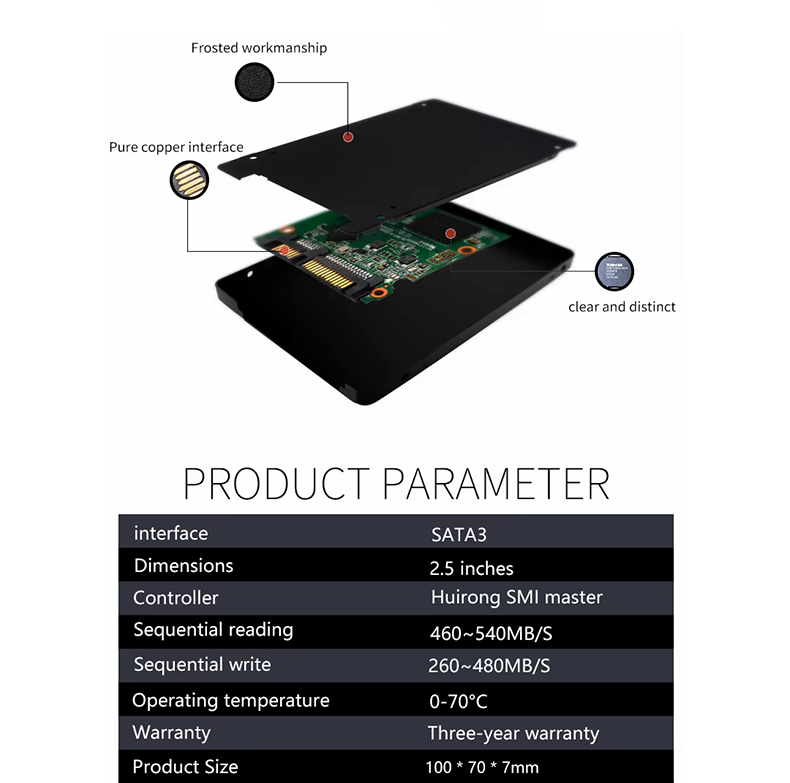
Experience superior performance with the PUSKILL 2.5″ 1TB Solid State Drive SSD SATA3. With 1TB storage capacity and read speeds up to 550MB/s, it's shock-resistant and ideal for upgrading your computer systems and gaming consoles. Elevate your user experience today.

EGP 3999.00

Earn 5,999 points on purchase

Product Information

Condition
New
Release date
Type
SATA SSD
Storage Capacity Storage Capacity The available space for saving games, files, and programs. السعة التخزينية هي المساحة المتاحة لحفظ الألعاب والملفات والبرامج. Storage Capacity The available space for saving games, files, and programs. السعة التخزينية هي المساحة المتاحة لحفظ الألعاب والملفات والبرامج.

1TB 1TB The available space for saving games, files, and programs. السعة التخزينية هي المساحة المتاحة لحفظ الألعاب والملفات والبرامج.
Read Speed Read Speed Read speed is how fast data can be opened from the storage. Higher speed helps games and programs open faster. سرعة القراءة هي سرعة فتح البيانات من وحدة التخزين. الرقم الأعلى يساعد الألعاب والبرامج تفتح أسرع. Read Speed Read speed is how fast data can be opened from the storage. Higher speed helps games and programs open faster. سرعة القراءة هي سرعة فتح البيانات من وحدة التخزين. الرقم الأعلى يساعد الألعاب والبرامج تفتح أسرع.
550 MB/s 550 MB/s Read speed is how fast data can be opened from the storage. Higher speed helps games and programs open faster. سرعة القراءة هي سرعة فتح البيانات من وحدة التخزين. الرقم الأعلى يساعد الألعاب والبرامج تفتح أسرع.
Write Speed Write Speed Write speed is how fast data can be saved or copied to the storage. Higher speed matters when moving large files or installing programs. سرعة الكتابة هي سرعة حفظ أو نسخ البيانات على وحدة التخزين. الرقم الأعلى يفرق في نقل الملفات الكبيرة وتثبيت البرامج. Write Speed Write speed is how fast data can be saved or copied to the storage. Higher speed matters when moving large files or installing programs. سرعة الكتابة هي سرعة حفظ أو نسخ البيانات على وحدة التخزين. الرقم الأعلى يفرق في نقل الملفات الكبيرة وتثبيت البرامج.
450 MB/s 450 MB/s Write speed is how fast data can be saved or copied to the storage. Higher speed matters when moving large files or installing programs. سرعة الكتابة هي سرعة حفظ أو نسخ البيانات على وحدة التخزين. الرقم الأعلى يفرق في نقل الملفات الكبيرة وتثبيت البرامج.
Form Factor Form Factor The size and shape of the storage drive. It must match the device or laptop so it can be installed correctly. حجم وشكل وحدة التخزين. لازم يكون مناسب للجهاز أو اللابتوب عشان يركب صح. Form Factor The size and shape of the storage drive. It must match the device or laptop so it can be installed correctly. حجم وشكل وحدة التخزين. لازم يكون مناسب للجهاز أو اللابتوب عشان يركب صح.
2.5-inch 2.5-inch The size and shape of the storage drive. It must match the device or laptop so it can be installed correctly. حجم وشكل وحدة التخزين. لازم يكون مناسب للجهاز أو اللابتوب عشان يركب صح.
Interface Interface The interface is how the storage connects to the device, such as SATA or NVMe. Faster connection methods help data load and open faster. الواجهة هي طريقة توصيل وحدة التخزين بالجهاز، زي SATA أو NVMe. طريقة التوصيل الأسرع تساعد في تحميل وفتح البيانات بشكل أسرع. Interface The interface is how the storage connects to the device, such as SATA or NVMe. Faster connection methods help data load and open faster. الواجهة هي طريقة توصيل وحدة التخزين بالجهاز، زي SATA أو NVMe. طريقة التوصيل الأسرع تساعد في تحميل وفتح البيانات بشكل أسرع.
SATA III SATA III The interface is how the storage connects to the device, such as SATA or NVMe. Faster connection methods help data load and open faster. الواجهة هي طريقة توصيل وحدة التخزين بالجهاز، زي SATA أو NVMe. طريقة التوصيل الأسرع تساعد في تحميل وفتح البيانات بشكل أسرع.


PUSKILL 2.5 SATA3 1TB SSD for PlayStation 4 and Computer

Features:

  • High-Speed Performance: Read speeds up to 550MB/s and write speeds up to 500MB/s.
  • Large Storage Capacity: 1TB storage for large games, updates, and save files.
  • Durable Design: Built with 3D NAND technology for enhanced reliability.
  • Energy Efficient: Reduced power consumption for cooler and quieter operation.
  • Compatibility: Works with all PS4 models, laptops, and desktops supporting 2.5-inch SATA drives.
  • Warranty: Comes with a 3-year warranty for peace of mind.

How to Replace Your PS4 Hard Drive with the PUSKILL SSD

Follow these steps to upgrade your PS4 storage to the PUSKILL SSD:

PS4 Model Upgrade Location Compatible with PUSKILL SSD
PS4 Original Under the shiny top cover ✔ Yes
PS4 Slim HDD bay at the rear ✔ Yes
PS4 Pro HDD bay at the rear ✔ Yes

Step-by-Step Guide:

  1. Back up your data: Use an external drive or cloud storage to save your existing PS4 data.
  2. Turn off the console: Ensure the PS4 is powered off and unplugged.
  3. Access the hard drive:
    • For PS4 Original:

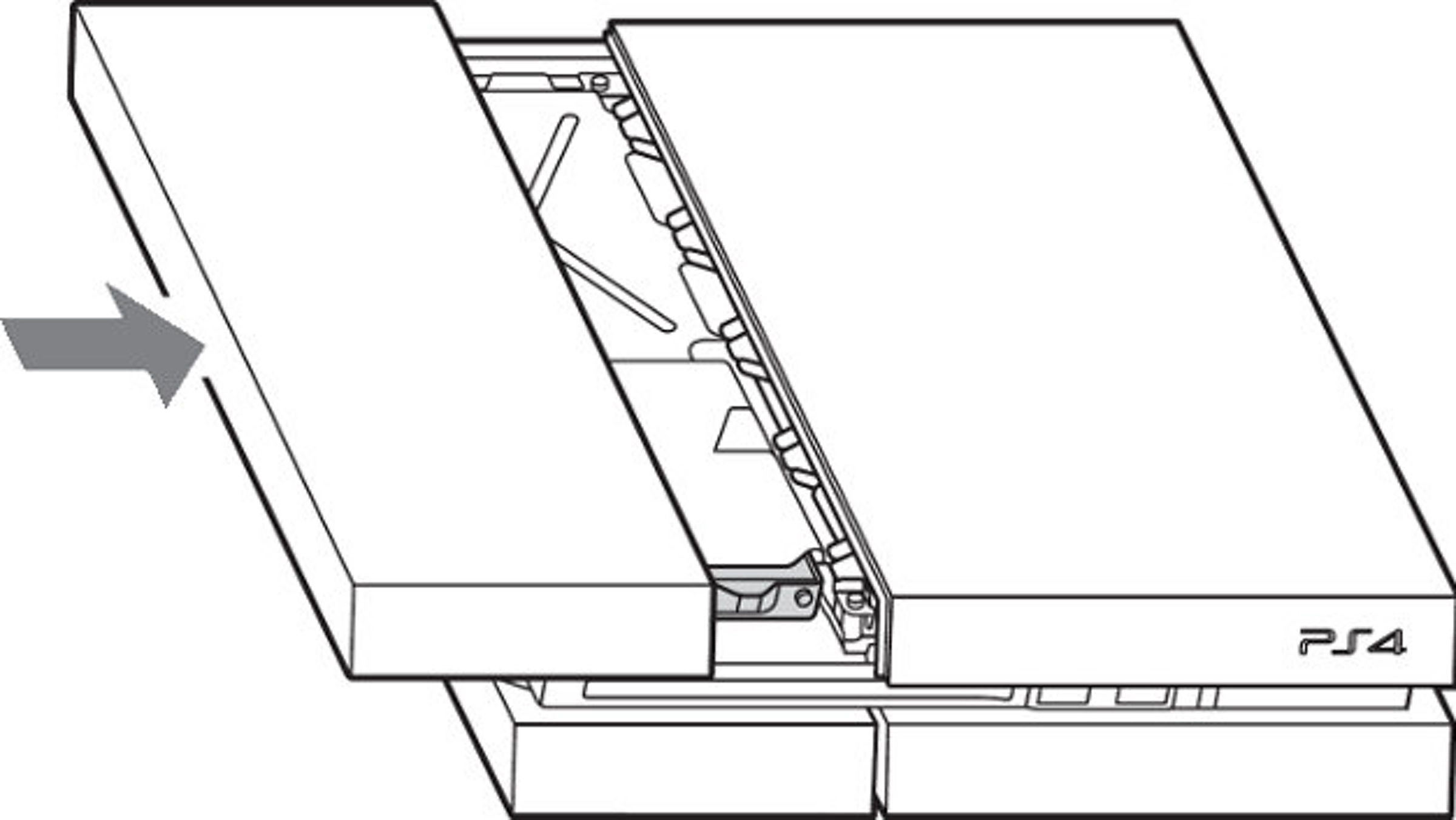
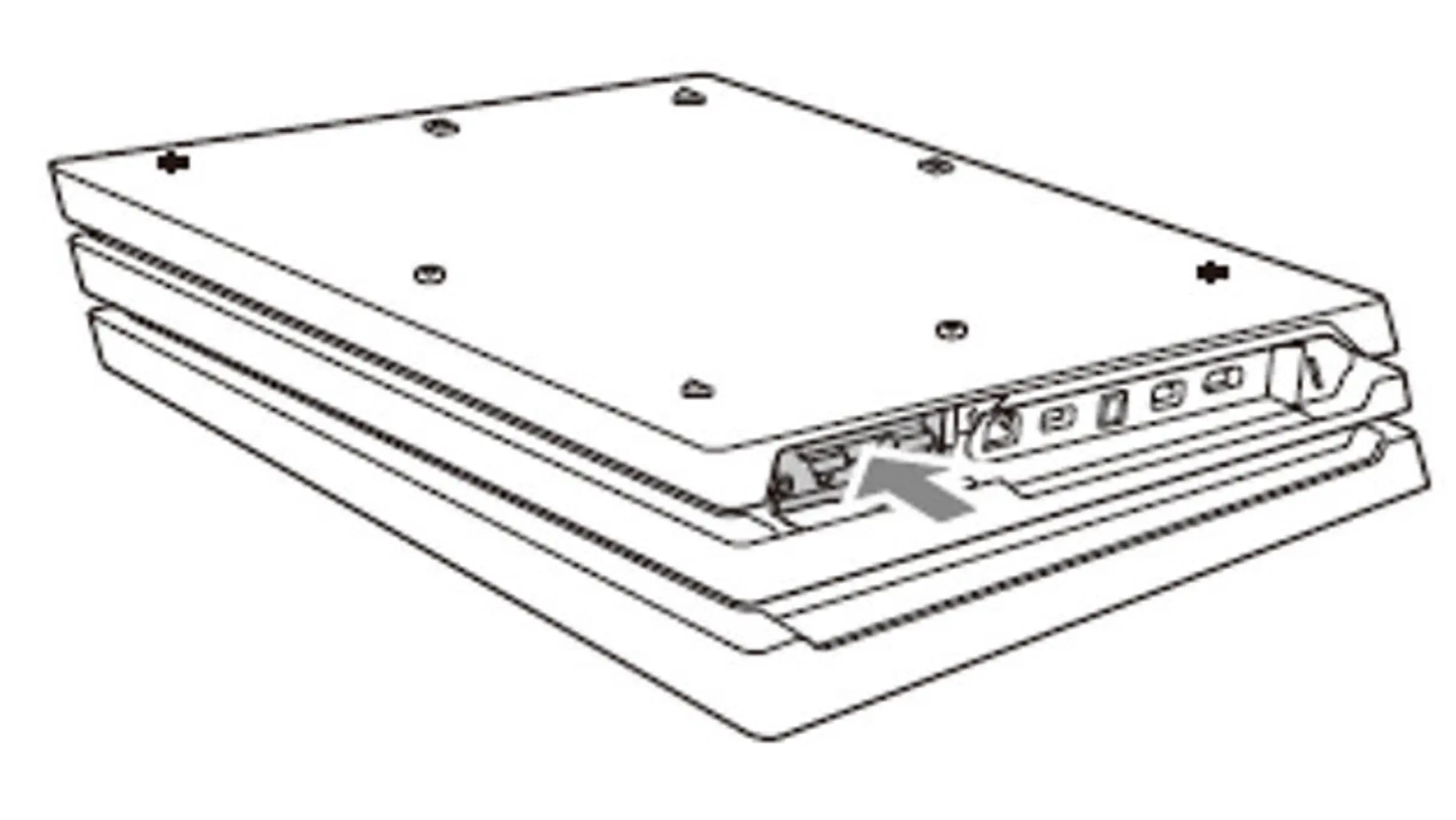
      Slide the top panel away from you.  A click will be heard, and the panel will move about 7mm. Lift the panel off starting from the left side.

      Screw with the PlayStation symbols on it.

      1- Remove the screw on side.
      2- Pull the HDD toward the front of the system to remove it.

      1- Remove the four screws holding the HDD in the caddy.
      2- Insert the replacement HDD into the caddy. 
      3- Insert the caddy into the PlayStation 4 bay.

      Replace the top panel. Place it over the exposed section of the PlayStation 4, about 7mm away from the seam. Now slide the panel towards the seam until it clicks into place.

    • For PS4 Slim:

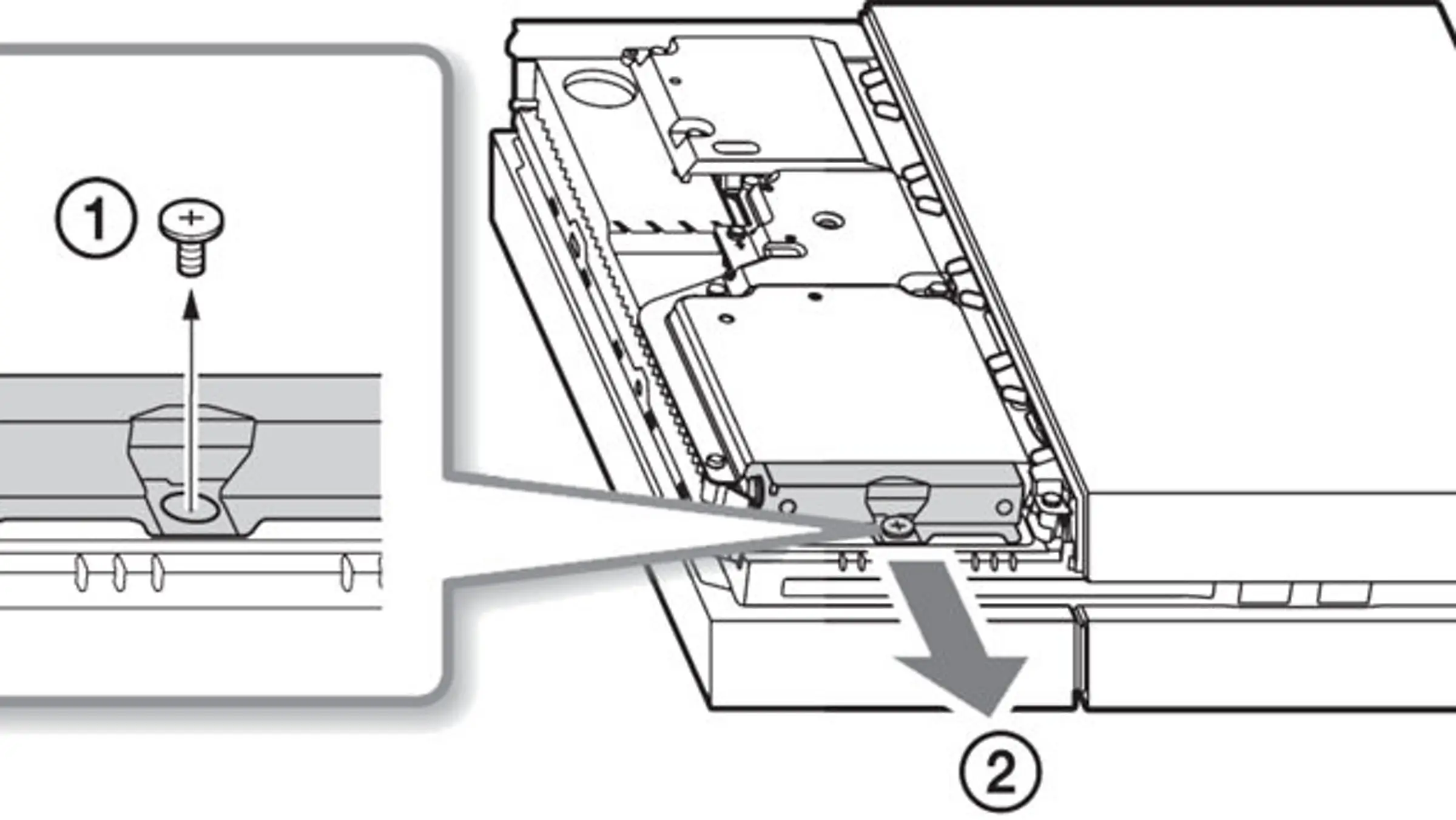
      Slide the HDD bay cover in the direction of the arrow to remove it.

      1- Remove the screw.
      2- Pull-on the hard disc drive with the mounting bracket to remove it.

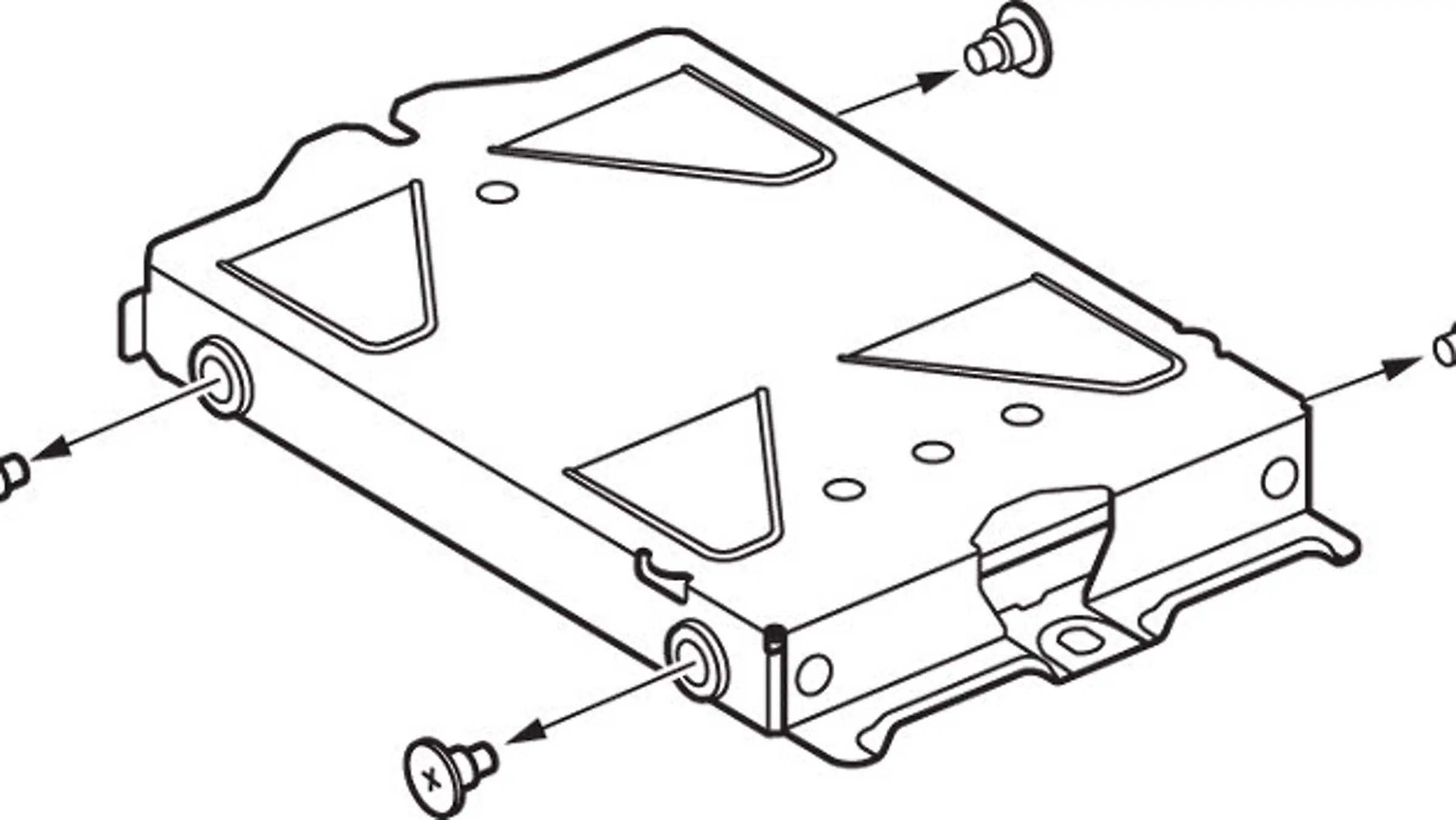
      Remove the screws (four places). Do not remove the rubber inserts from the screw holes.

      1- Remove the HDD from the mounting bracket and insert the replacement.
      2- Replace the screws; being careful not to over-tighten them.

      Attach the HDD to the system using the screw. Be sure to fully insert the HDD in the HDD bay.

    • For PS4 Pro:

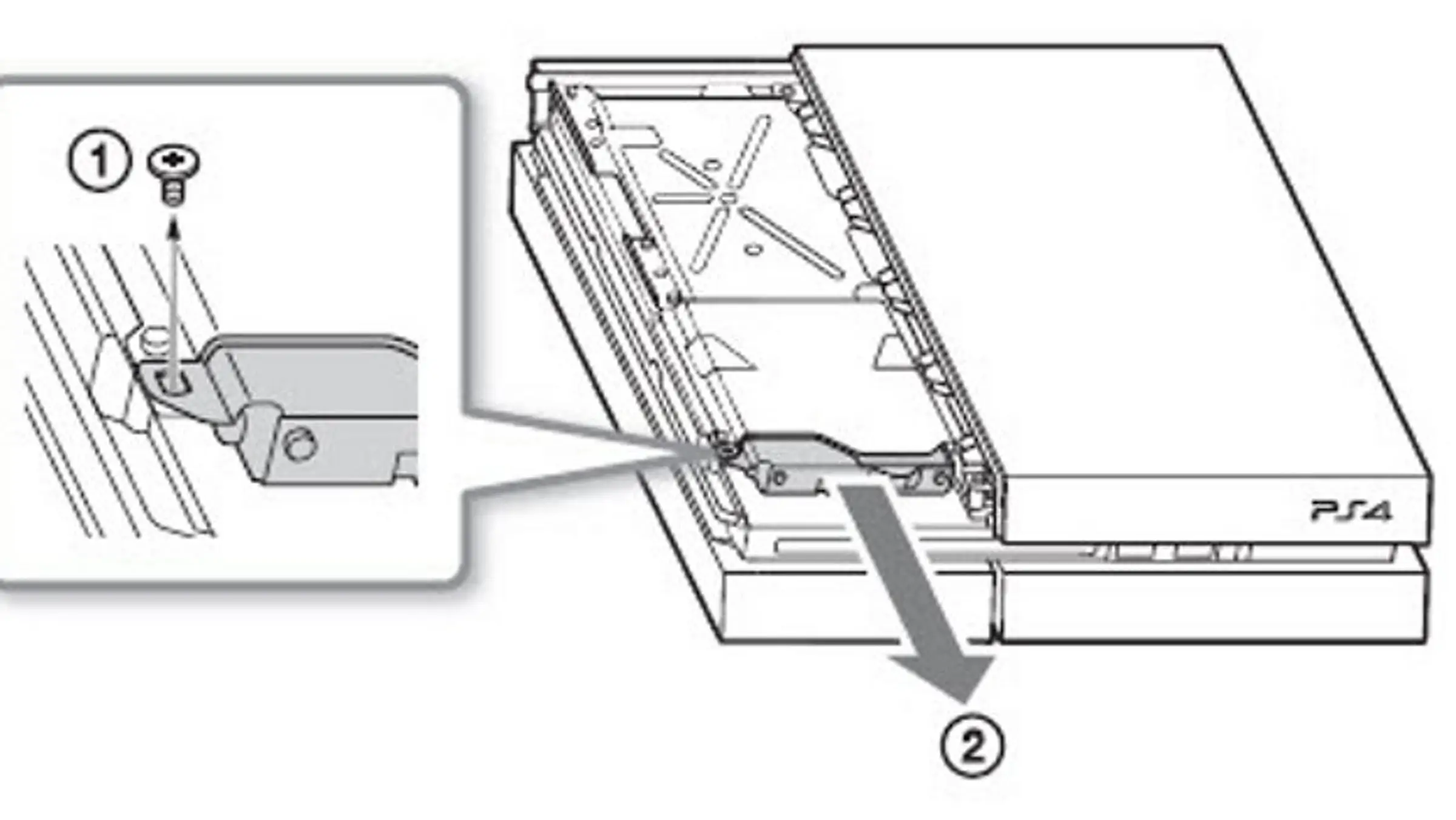
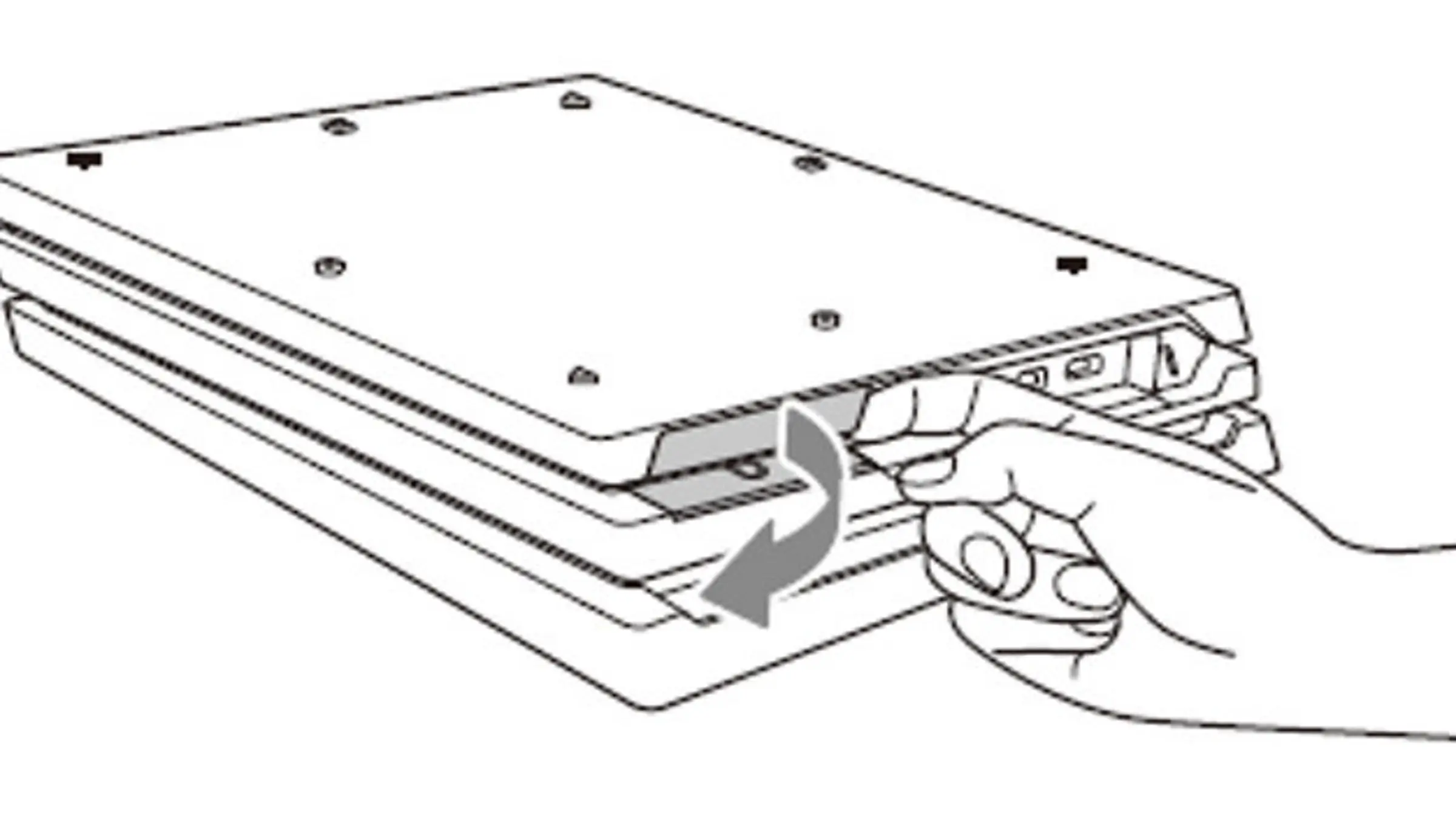
      Remove from the right side first.

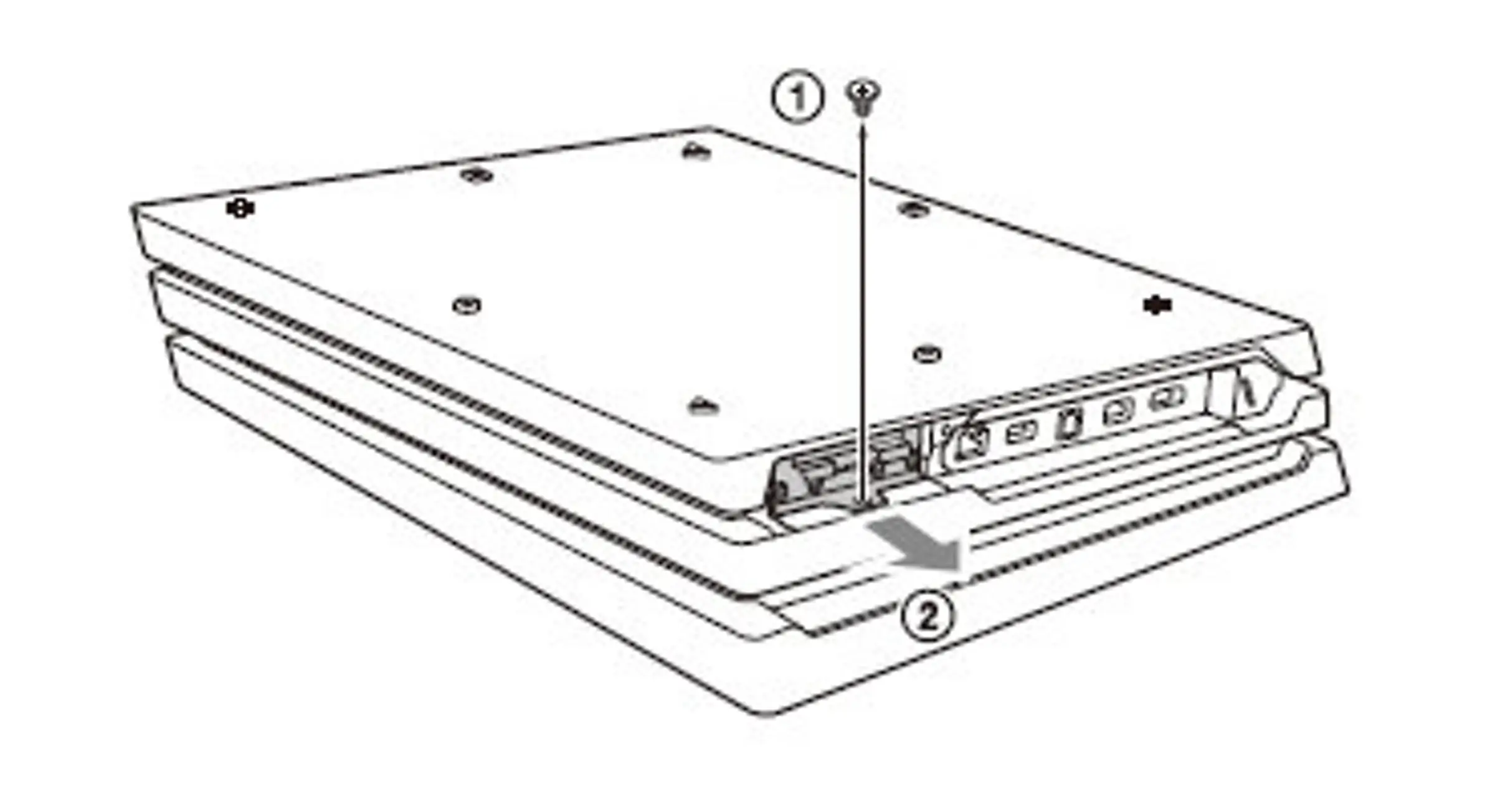
      Remove the screw (1) and pull the HDD mounting bracket (2) to remove it.

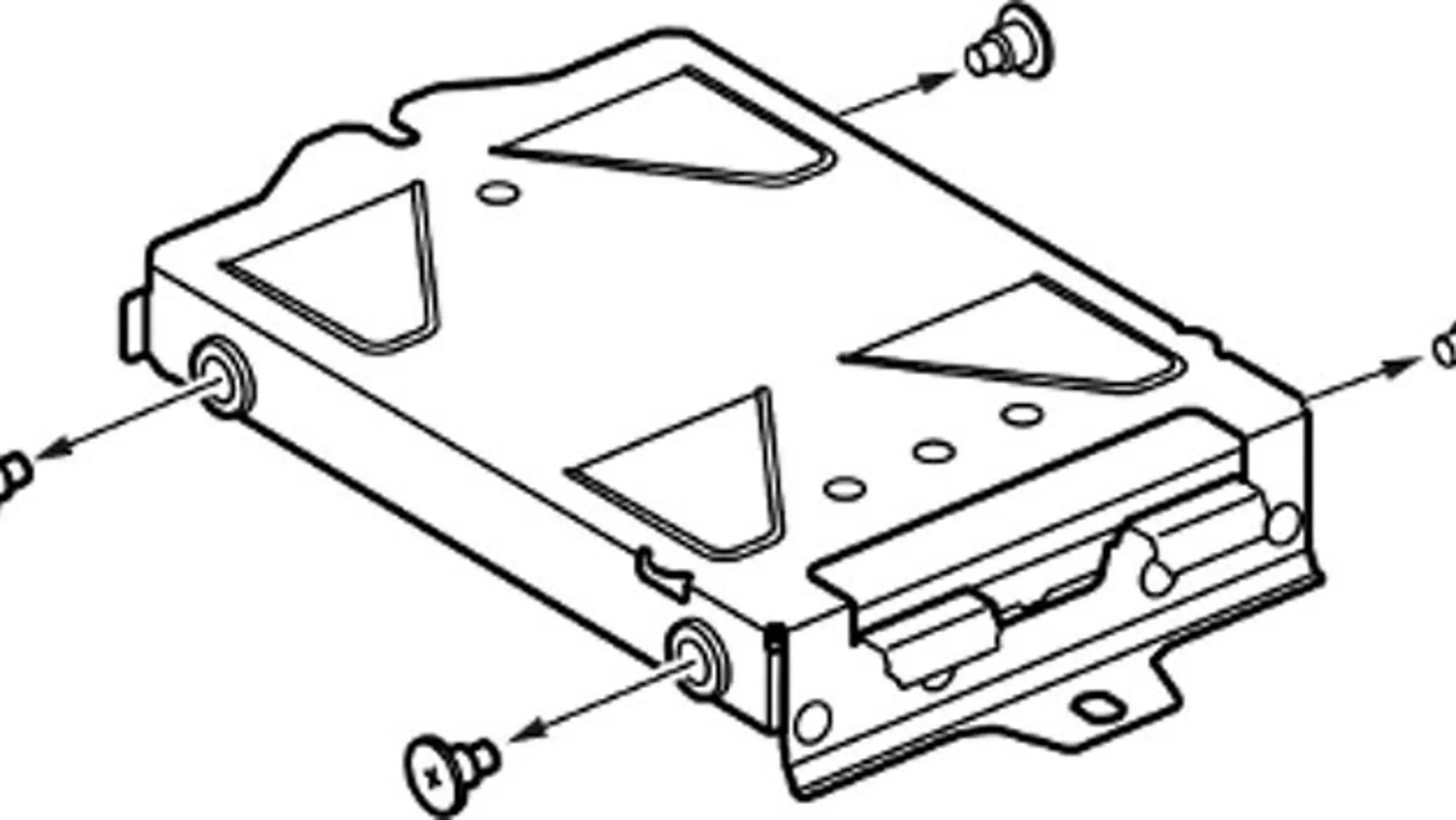
      1- Remove the four screws from the HDD mounting bracket.
      2- Remove the HDD from the mounting bracket and insert the replacement.
      3- Replace the screws; being careful not to over-tighten them.

      1- Reinsert the HDD mounting bracket.
      2- Replace the screw.
      3- Re-attach the HDD cover.

  4. Replace the drive: Remove the old HDD from the bracket and install the PUSKILL SSD.
  5. Reinstall the system software:
    1. Download the latest PS4 firmware from the PlayStation support site.
    2. Copy it to a USB drive formatted to FAT32, under a folder named PS4 > UPDATE.
    3. Insert the USB drive into the PS4, boot into Safe Mode, and select "Initialize PS4 (Reinstall System Software)."
  6. Restore your data: Use the backup to restore your saved data.

Upgrade your gaming experience today with the PUSKILL 2.5 SATA3 1TB SSD for PS4!

Buying guide

Understand the most important product specifications before buying.

Storage Capacity

1TB

The available space for saving games, files, and programs.

السعة التخزينية هي المساحة المتاحة لحفظ الألعاب والملفات والبرامج.

Read Speed

550 MB/s

Read speed is how fast data can be opened from the storage. Higher speed helps games and programs open faster.

سرعة القراءة هي سرعة فتح البيانات من وحدة التخزين. الرقم الأعلى يساعد الألعاب والبرامج تفتح أسرع.

Write Speed

450 MB/s

Write speed is how fast data can be saved or copied to the storage. Higher speed matters when moving large files or installing programs.

سرعة الكتابة هي سرعة حفظ أو نسخ البيانات على وحدة التخزين. الرقم الأعلى يفرق في نقل الملفات الكبيرة وتثبيت البرامج.

Form Factor

2.5-inch

The size and shape of the storage drive. It must match the device or laptop so it can be installed correctly.

حجم وشكل وحدة التخزين. لازم يكون مناسب للجهاز أو اللابتوب عشان يركب صح.

Interface

SATA III

The interface is how the storage connects to the device, such as SATA or NVMe. Faster connection methods help data load and open faster.

الواجهة هي طريقة توصيل وحدة التخزين بالجهاز، زي SATA أو NVMe. طريقة التوصيل الأسرع تساعد في تحميل وفتح البيانات بشكل أسرع.

Locate Your Nearest Store

This game is available in 0 store

Maadi

Nasr street, in front of SAIB Bank Maadi, Cairo, Egypt

Point 90

Point 90 Mall, in 3nd Floor, in front of cinemas, 5th Settlement Cairo, Egypt

Amreciana Plaza

Amricana Plaza, in front of IMax Cinemas, El Sheikh Zayed, 6 October Giza, Egypt

Mohandessin

7 Wadi El Nil st, intersection with Gameet el Dewal, infront of Emirates NBD Bank and beside Samsung

6th Of October

Green park mall, infront of 6th october sports club, at 26th of July Corridor

Alexandria City Centre

Cairo Alex Desert Rd, Qetaa at Tarik as Sahrawi, Amreya 1, Alexandria Governorate 5258730

City Stars

Citystars in front of Gate 5, Nasr City, Cairo Governorate

Home delivery

PUSKILL 2.5 SATA3 1TB Solid State Drive SSD for PS4 and Computer is currently not available for home delivery service
This product can be activated in selected country
This product cannot be activated in selected country