

Logitech MK540 Advanced Wireless Keyboard and Mouse Combo - Black
Full-size wireless keyboard and 1000 DPI optical mouse combo with 2.4GHz USB connectivity, palm rest, and up to 36 months of keyboard battery life.
Earn 3,824 points on purchase
- Compatibility PC Mac
- Connection Type 2.4GHz Wireless USB Receiver
- Battery Life 0 h
- Device Type Keyboard & Mouse Combo
- Max DPI 1000
- Programmable Buttons 0
About the product
Logitech MK540 Advanced Wireless Keyboard and Mouse Combo - Black
Give your desk a more organized feel with the Logitech MK540 Advanced, a wireless keyboard and mouse combo designed for comfortable everyday computing. The keyboard combines a familiar typing layout with practical shortcuts, while the matching mouse provides smooth cursor control. Together, they create a convenient setup for studying, office work, browsing, and managing documents without separate cables running across your workspace.


- Familiar Full-Size Typing The full-size keyboard includes a dedicated number pad and carefully shaped keys, giving you a familiar layout for writing, data entry, and everyday computer tasks.
- Comfort Throughout Your Workday An integrated palm rest and adjustable tilt legs help you find a comfortable typing position during longer sessions at your desk.
- A Mouse for Either Hand The contoured mouse features soft rubber side grips and an ambidextrous shape, making it comfortable for both right-handed and left-handed users.
- One Receiver for the Combo The keyboard and mouse connect through a single Logitech Unifying USB receiver, keeping the setup simple without requiring separate receivers for each device.

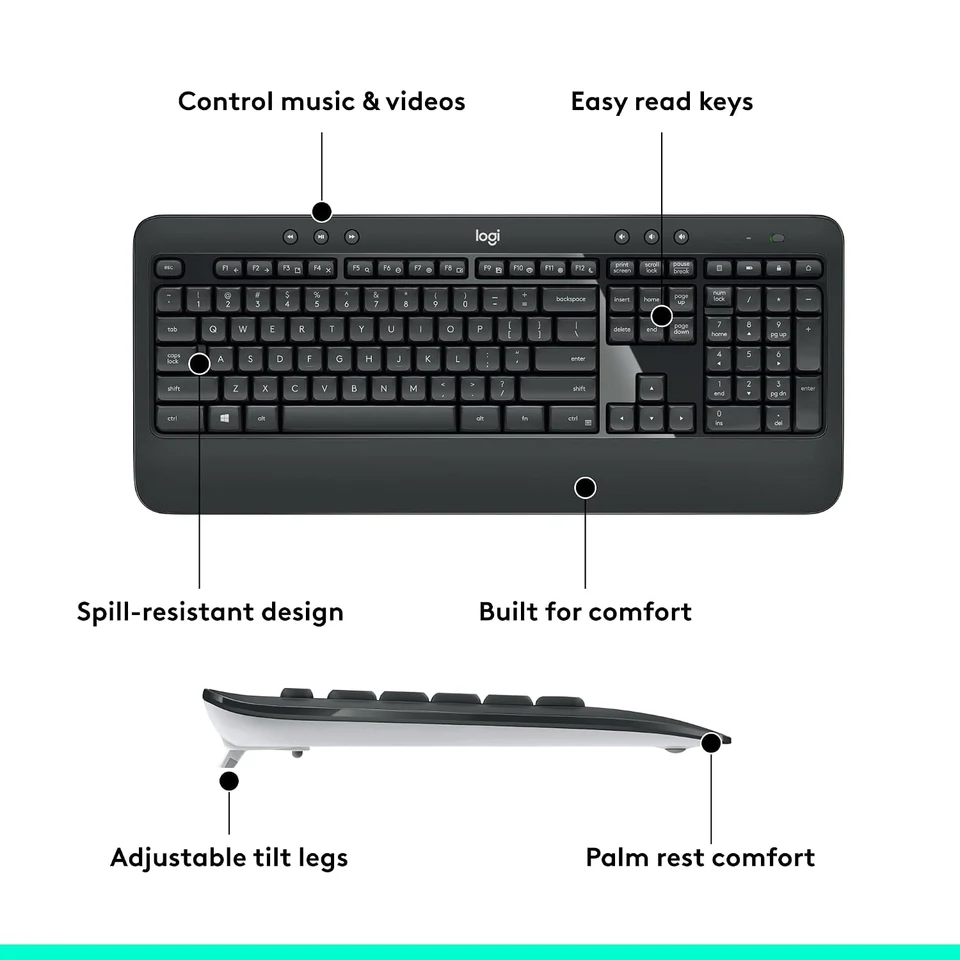

- Comfortable Typing
- Wireless Freedom
- Unifying Receiver
- Everyday Productivity
- Optical Precision
- Useful Shortcuts
Logitech MK540 Advanced: A Complete Everyday Setup
Reliable Wireless Performance
Connection and Tracking
- 10m Manufacturer-Listed Wireless Range
- 1,000 DPI Mouse Optical Tracking Resolution
Keep your keyboard and mouse connected through one receiver, with comfortable controls ready for your daily tasks.
Typing Features That Make Work Easier
Protection Against Everyday Accidents
How to Connect Your Wireless Keyboard and Mouse
Simple Plug-and-Play Setup
- Prepare the Keyboard and Mouse Place both devices on your desk and check that their batteries are correctly installed. Remove any battery isolation tabs present in the retail package.
- Turn On Both Devices Use the power switches on the keyboard and mouse to activate them.
- Connect the USB Receiver Insert the supplied Logitech Unifying receiver into an available USB port on your compatible computer.
- Start Typing and Navigating The included receiver is the intended connection method for both devices. Check that the keyboard responds to typing and that the mouse moves the pointer normally.
- Personalize Supported Shortcuts If desired, use Logitech's supported customization software to change compatible function-key and shortcut assignments on an eligible computer.
Compatible Systems and Software
Windows Computers
Wireless input through the supplied USB receiver. Logitech's original MK540 Advanced compatibility documentation lists Windows 7, Windows 8, and Windows 10 or later.
The keyboard and mouse provide normal input functionality through the Unifying connection. Optional shortcut customization depends on the operating system and supported Logitech software version.
ChromeOS Computers
Standard keyboard and mouse functionality. Logitech also lists ChromeOS among the supported platforms for this combo.
Connect the Unifying receiver to an available USB port on a compatible computer. Advanced customization functions documented for Logitech's desktop software should not be assumed to work identically on ChromeOS.
What Makes This Combo Practical?
Verified Features
- Dedicated Number PadThe keyboard includes a separate number section for data entry and calculations. Yes
- Adjustable Keyboard PositionThe keyboard has adjustable legs to help you select a preferred typing angle. Yes
- Customizable Function KeysSupported shortcut actions can be personalized using compatible Logitech software. Yes
- Mouse Scroll WheelThe mouse uses a ratcheted wheel for controlled, line-by-line scrolling. Yes
- Keyboard BacklightingLogitech's official specifications confirm that the keyboard does not have illuminated typing keys. No
- Multi-Device Easy-SwitchThe MK540 keyboard and mouse are not listed as Easy-Switch models for quickly changing between paired computers. No
Official Hardware Information
Component Details
- Keyboard Weight Without Batteries
- 805 g
- Mouse Weight Without Batteries
- 73.5 g
- Adjustable Keyboard Tilt Positions
- 4° and 8°
- Wireless Technology
- 2.4 GHz Unifying
Product Specifications
| Device Type | Keyboard & Mouse Combo |
|---|---|
| Keyboard Layout / Size | Full Size |
| Color | Black |
|---|---|
| Connection Type | 2.4GHz Wireless, USB Receiver |
| Mouse Sensor Type | Optical |
| Lighting | No Lighting |
| Compatibility | PC, Mac |
| Mouse Hand Orientation | Ambidextrous |
| Battery Life | 0 h |
|---|---|
| Max DPI | 1000 |
| Programmable Buttons | 0 |
| Keystroke Lifespan | 5000000 |
| Weight | 515 |
The MK540 Advanced Introduction
- 15 February 2018 Official Logitech Announcement Logitech introduces the wireless combo with an emphasis on familiar typing, an ambidextrous mouse, comfortable controls, and convenient receiver-based connectivity.
What's Included in the Box?
Officially Listed Package Contents
- Logitech K540 Wireless Keyboard
- Logitech M310 Wireless Mouse
- Logitech Unifying USB Receiver
- 3 AA Alkaline Batteries (Pre-installed)
- User Documentation
Frequently Asked Questions
Does the Logitech MK540 wireless keyboard and mouse use Bluetooth?
Logitech specifies a Unifying USB receiver as the connection method for this combo. Direct Bluetooth pairing is not documented for the MK540 Advanced. Use the included receiver to connect the keyboard and mouse.
Does the Logitech MK540 keyboard have Arabic letters?
Logitech officially lists an Arabic-layout version under manufacturer part number 920-008693. However, the Games2Egypt product title does not specify the exact keyboard layout. Please confirm the printed Arabic and English characters on the stocked unit before purchasing.
Is the MK540 Advanced a mechanical gaming keyboard?
Logitech describes its keyboard mechanism as Plunger and positions the combo for comfortable, general-purpose computing. It is not advertised as a mechanical gaming keyboard with specialized gaming switches.
Can I use the MK540 keyboard and mouse with a Mac?
Logitech's original MK540 hardware compatibility list names Windows and ChromeOS, while a separate official document mentions macOS support for optional Logitech Options software. These statements do not independently confirm full hardware compatibility with every Mac. Please verify compatibility with your specific Mac before purchasing.
Can I change the Logitech MK540 keyboard shortcuts?
Yes. Logitech documents customizable function-key and hotkey actions through compatible Logitech software. The available options depend on the operating system and software version.
Specifications
Product
- Condition
- New
- Release date
- 25 October 2026
Compatibility
- Compatibility
- PC Mac
Connection and power
- Connection Type
- 2.4GHz Wireless USB Receiver
- Battery Life
- 0 h
Features
- Device Type
- Keyboard & Mouse Combo
- Color
- Black
More details
- Keyboard Layout / Size
- Full Size
- Mouse Sensor Type
- Optical
- Max DPI
- 1000
- Programmable Buttons
- 0
- Lighting
- No Lighting
- Keystroke Lifespan
- 5000000
- Weight
- 515
- Mouse Hand Orientation
- Ambidextrous

You may also like

Fantech Maxfit 108 MK855 RGB Wired Mechanical Keyboard Blue Switches - White
Keyboard And Mouse EGP 2,349
Fantech ATOM PRO-MK919 RGB Wireless Mechanical Gaming Keyboard Blue Switch - Black
Keyboard And Mouse EGP 2,199
Fantech ATOM63-MK874v2 Wired Mechanical Gaming Keyboard Sky Blue - Red Switch
Keyboard And Mouse EGP 1,149
Logitech G502 X Wired Gaming Mouse - White - Open Sealed
Keyboard And Mouse EGP 4,099
Logitech G915 X Lightspeed Low-Profile TKL Wireless Gaming Keyboard - Black
Keyboard And Mouse EGP 11,399
Logitech Lift Vertical Ergonomic Wireless Mouse - Graphite
Keyboard And Mouse EGP 4,199
Logitech Pro X Superlight 2c Wireless Gaming Mouse - Black
Keyboard And Mouse EGP 7,349