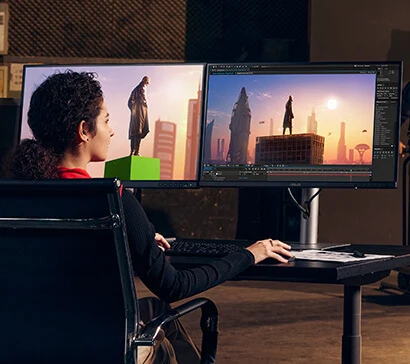
ASUS ProArt Display PA278CFRV is a 27-inch 4K UHD professional monitor designed for creators and color-critical workflows. Featuring 100% sRGB and Rec.709 color gamut, factory calibration, and Calman Verified certification, it ensures industry-leading color accuracy. With USB-C, DisplayPort, and ergonomic design, it's perfect for video editing, photography, and graphic design. HDR support and ultra-thin bezels make it both powerful and elegant. Ideal for professionals seeking precise visuals and seamless connectivity in a sleek, modern package.
Like us for the latest gaming news & exclusive offers!
Product Information
Condition
New
Release date
Product Type
Professional Monitor
Screen SizeScreen Size
The screen size shows how large the display area is.
حجم الشاشة بيوضح مساحة العرض.
Screen Size
The screen size shows how large the display area is.
حجم الشاشة بيوضح مساحة العرض.
27"27"
The screen size shows how large the display area is.
حجم الشاشة بيوضح مساحة العرض.
ResolutionResolution
Resolution is the number of tiny dots that make up the image, called pixels. For example, 1920×1080 means 1920 pixels wide and 1080 pixels tall. Fewer pixels make the image look less sharp and may show more rough edges, especially on large screens. More pixels make the image cleaner, sharper, and better at showing small details.
الـ Resolution أو دقة الشاشة هي عدد النقط الصغيرة جدًا اللي بتكوّن الصورة، واسمها Pixels. مثلًا 1920×1080 معناها الصورة فيها 1920 نقطة بالعرض و1080 نقطة بالطول. كل ما عدد الـ Pixels يكون أقل، الصورة تبان أقل حدة وقد يظهر فيها تكسير أو تفاصيل أقل، خصوصًا على الشاشات الكبيرة. كل ما العدد يزيد، الصورة تبان أنضف وأوضح والتفاصيل الصغيرة تكون أسهل في الرؤية.
Resolution
Resolution is the number of tiny dots that make up the image, called pixels. For example, 1920×1080 means 1920 pixels wide and 1080 pixels tall. Fewer pixels make the image look less sharp and may show more rough edges, especially on large screens. More pixels make the image cleaner, sharper, and better at showing small details.
الـ Resolution أو دقة الشاشة هي عدد النقط الصغيرة جدًا اللي بتكوّن الصورة، واسمها Pixels. مثلًا 1920×1080 معناها الصورة فيها 1920 نقطة بالعرض و1080 نقطة بالطول. كل ما عدد الـ Pixels يكون أقل، الصورة تبان أقل حدة وقد يظهر فيها تكسير أو تفاصيل أقل، خصوصًا على الشاشات الكبيرة. كل ما العدد يزيد، الصورة تبان أنضف وأوضح والتفاصيل الصغيرة تكون أسهل في الرؤية.
1440p QHD1440p QHD
Resolution is the number of tiny dots that make up the image, called pixels. For example, 1920×1080 means 1920 pixels wide and 1080 pixels tall. Fewer pixels make the image look less sharp and may show more rough edges, especially on large screens. More pixels make the image cleaner, sharper, and better at showing small details.
الـ Resolution أو دقة الشاشة هي عدد النقط الصغيرة جدًا اللي بتكوّن الصورة، واسمها Pixels. مثلًا 1920×1080 معناها الصورة فيها 1920 نقطة بالعرض و1080 نقطة بالطول. كل ما عدد الـ Pixels يكون أقل، الصورة تبان أقل حدة وقد يظهر فيها تكسير أو تفاصيل أقل، خصوصًا على الشاشات الكبيرة. كل ما العدد يزيد، الصورة تبان أنضف وأوضح والتفاصيل الصغيرة تكون أسهل في الرؤية.
Refresh RateRefresh Rate
Refresh rate is how many images the screen can show every second, measured in Hz. For example, 60Hz means 60 images per second, while 144Hz means 144 images per second. Higher refresh rate makes motion look smoother and feel faster, especially in fast games.
معدل التحديث هو عدد الصور اللي الشاشة تقدر تعرضها في الثانية، وبيتقاس بـ Hz. مثلًا 60Hz يعني 60 صورة في الثانية، و144Hz يعني 144 صورة في الثانية. كل ما الرقم أعلى، الحركة تبان أنعم وأسرع في الاستجابة، وده مهم جدًا في الألعاب السريعة.
Refresh Rate
Refresh rate is how many images the screen can show every second, measured in Hz. For example, 60Hz means 60 images per second, while 144Hz means 144 images per second. Higher refresh rate makes motion look smoother and feel faster, especially in fast games.
معدل التحديث هو عدد الصور اللي الشاشة تقدر تعرضها في الثانية، وبيتقاس بـ Hz. مثلًا 60Hz يعني 60 صورة في الثانية، و144Hz يعني 144 صورة في الثانية. كل ما الرقم أعلى، الحركة تبان أنعم وأسرع في الاستجابة، وده مهم جدًا في الألعاب السريعة.
100Hz100Hz
Refresh rate is how many images the screen can show every second, measured in Hz. For example, 60Hz means 60 images per second, while 144Hz means 144 images per second. Higher refresh rate makes motion look smoother and feel faster, especially in fast games.
معدل التحديث هو عدد الصور اللي الشاشة تقدر تعرضها في الثانية، وبيتقاس بـ Hz. مثلًا 60Hz يعني 60 صورة في الثانية، و144Hz يعني 144 صورة في الثانية. كل ما الرقم أعلى، الحركة تبان أنعم وأسرع في الاستجابة، وده مهم جدًا في الألعاب السريعة.
Panel TypePanel Type
The panel type is the screen technology itself. It affects colors, motion speed, viewing angle, and black depth.
نوع البانل هو تقنية الشاشة نفسها. بيأثر على الألوان، سرعة الحركة، زاوية الرؤية، وعمق اللون الأسود.
Panel Type
The panel type is the screen technology itself. It affects colors, motion speed, viewing angle, and black depth.
نوع البانل هو تقنية الشاشة نفسها. بيأثر على الألوان، سرعة الحركة، زاوية الرؤية، وعمق اللون الأسود.
IPS stands for In-Plane Switching. It is known for good colors and wide viewing angles, so the picture stays clearer when viewed from the side.
IPS اختصار لـ In-Plane Switching. معروف بألوان كويسة وزوايا رؤية واسعة، فالصورة تفضل أوضح حتى من الجنب.
IPSIPS
The panel type is the screen technology itself. It affects colors, motion speed, viewing angle, and black depth.
نوع البانل هو تقنية الشاشة نفسها. بيأثر على الألوان، سرعة الحركة، زاوية الرؤية، وعمق اللون الأسود.
IPS stands for In-Plane Switching. It is known for good colors and wide viewing angles, so the picture stays clearer when viewed from the side.
IPS اختصار لـ In-Plane Switching. معروف بألوان كويسة وزوايا رؤية واسعة، فالصورة تفضل أوضح حتى من الجنب.
Screen ShapeScreen Shape
Shows whether the screen is flat or curved. Curved screens can feel more immersive, especially in larger sizes.
شكل الشاشة يوضح هل هي مسطحة أو منحنية. الشاشة المنحنية بتدي إحساس اندماج أكتر، خصوصًا في الأحجام الكبيرة.
Screen Shape
Shows whether the screen is flat or curved. Curved screens can feel more immersive, especially in larger sizes.
شكل الشاشة يوضح هل هي مسطحة أو منحنية. الشاشة المنحنية بتدي إحساس اندماج أكتر، خصوصًا في الأحجام الكبيرة.
FlatFlat
Shows whether the screen is flat or curved. Curved screens can feel more immersive, especially in larger sizes.
شكل الشاشة يوضح هل هي مسطحة أو منحنية. الشاشة المنحنية بتدي إحساس اندماج أكتر، خصوصًا في الأحجام الكبيرة.
Response Time (ms)Response Time (ms)
Response time means how fast the screen reacts to movement. Lower response time makes fast games look cleaner and reduces blur behind moving objects.
زمن الاستجابة يعني الشاشة بتلحق الحركة بسرعة قد إيه. كل ما الرقم أقل، الألعاب السريعة تبان أوضح ويقل التشويش أو الظل اللي بيظهر ورا الحركة.
Response Time (ms)
Response time means how fast the screen reacts to movement. Lower response time makes fast games look cleaner and reduces blur behind moving objects.
زمن الاستجابة يعني الشاشة بتلحق الحركة بسرعة قد إيه. كل ما الرقم أقل، الألعاب السريعة تبان أوضح ويقل التشويش أو الظل اللي بيظهر ورا الحركة.
5ms5ms
Response time means how fast the screen reacts to movement. Lower response time makes fast games look cleaner and reduces blur behind moving objects.
زمن الاستجابة يعني الشاشة بتلحق الحركة بسرعة قد إيه. كل ما الرقم أقل، الألعاب السريعة تبان أوضح ويقل التشويش أو الظل اللي بيظهر ورا الحركة.
HDR (High Dynamic Range)HDR (High Dynamic Range)
High Dynamic Range (HDR) means the screen can show a wider difference between dark and bright areas. Without HDR, a scene with strong light and shadow may lose detail: bright areas can look too white, and dark areas can look too black.
High Dynamic Range (HDR) تقنية معناها إن الشاشة تقدر تعرض فرق أكبر بين الأماكن الغامقة والفاتحة. من غير HDR، المشهد اللي فيه ضوء قوي وظل ممكن تلاقي الجزء المنور أبيض زيادة والتفاصيل ضايعة، أو الجزء الغامق أسود ومش واضح.
HDR (High Dynamic Range)
High Dynamic Range (HDR) means the screen can show a wider difference between dark and bright areas. Without HDR, a scene with strong light and shadow may lose detail: bright areas can look too white, and dark areas can look too black.
High Dynamic Range (HDR) تقنية معناها إن الشاشة تقدر تعرض فرق أكبر بين الأماكن الغامقة والفاتحة. من غير HDR، المشهد اللي فيه ضوء قوي وظل ممكن تلاقي الجزء المنور أبيض زيادة والتفاصيل ضايعة، أو الجزء الغامق أسود ومش واضح.
DisplayHDR 400 is a VESA HDR certification level. It means the screen reaches a basic HDR brightness level, but it is entry-level HDR compared to higher DisplayHDR levels.
DisplayHDR 400 مستوى اعتماد HDR من VESA. معناه إن الشاشة بتوصل لمستوى HDR أساسي في السطوع، لكنه مستوى أولي مقارنة بالمستويات الأعلى.
DisplayHDR 400DisplayHDR 400
High Dynamic Range (HDR) means the screen can show a wider difference between dark and bright areas. Without HDR, a scene with strong light and shadow may lose detail: bright areas can look too white, and dark areas can look too black.
High Dynamic Range (HDR) تقنية معناها إن الشاشة تقدر تعرض فرق أكبر بين الأماكن الغامقة والفاتحة. من غير HDR، المشهد اللي فيه ضوء قوي وظل ممكن تلاقي الجزء المنور أبيض زيادة والتفاصيل ضايعة، أو الجزء الغامق أسود ومش واضح.
DisplayHDR 400 is a VESA HDR certification level. It means the screen reaches a basic HDR brightness level, but it is entry-level HDR compared to higher DisplayHDR levels.
DisplayHDR 400 مستوى اعتماد HDR من VESA. معناه إن الشاشة بتوصل لمستوى HDR أساسي في السطوع، لكنه مستوى أولي مقارنة بالمستويات الأعلى.
Variable Refresh Rate (VRR)Variable Refresh Rate (VRR)
Any video or game is made of many still images shown quickly one after another, and each image is called a frame. The number of frames the game produces per second is called FPS. When FPS goes up and down during gameplay, VRR lets the screen adjust its speed to match the game, making motion smoother and reducing screen tearing.
أي فيديو أو لعبة هو في الأصل صور ثابتة كتير بتتعرض ورا بعض بسرعة، وكل صورة اسمها Frame. عدد الصور اللي اللعبة بتطلعها في الثانية اسمه FPS. أحيانًا الـ FPS يعلى وينزل أثناء اللعب، فلو الشاشة ثابتة على سرعة معينة واللعبة سرعتها بتتغير، ممكن يظهر تقطيع أو كسر في الصورة. VRR بيخلي الشاشة تغيّر سرعتها مع اللعبة لحظة بلحظة، فتظهر الحركة أنعم ويقل التقطيع لما أداء اللعبة يتغير.
Variable Refresh Rate (VRR)
Any video or game is made of many still images shown quickly one after another, and each image is called a frame. The number of frames the game produces per second is called FPS. When FPS goes up and down during gameplay, VRR lets the screen adjust its speed to match the game, making motion smoother and reducing screen tearing.
أي فيديو أو لعبة هو في الأصل صور ثابتة كتير بتتعرض ورا بعض بسرعة، وكل صورة اسمها Frame. عدد الصور اللي اللعبة بتطلعها في الثانية اسمه FPS. أحيانًا الـ FPS يعلى وينزل أثناء اللعب، فلو الشاشة ثابتة على سرعة معينة واللعبة سرعتها بتتغير، ممكن يظهر تقطيع أو كسر في الصورة. VRR بيخلي الشاشة تغيّر سرعتها مع اللعبة لحظة بلحظة، فتظهر الحركة أنعم ويقل التقطيع لما أداء اللعبة يتغير.
Adaptive-Sync is a Variable Refresh Rate standard that lets the screen change its refresh rate with the game FPS. This makes motion smoother and reduces tearing.
Adaptive-Sync معيار Variable Refresh Rate بيخلي الشاشة تغير معدل التحديث حسب FPS اللعبة. ده ينعم الحركة ويقلل تقطيع الصورة.
Adaptive-SyncAdaptive-Sync
Any video or game is made of many still images shown quickly one after another, and each image is called a frame. The number of frames the game produces per second is called FPS. When FPS goes up and down during gameplay, VRR lets the screen adjust its speed to match the game, making motion smoother and reducing screen tearing.
أي فيديو أو لعبة هو في الأصل صور ثابتة كتير بتتعرض ورا بعض بسرعة، وكل صورة اسمها Frame. عدد الصور اللي اللعبة بتطلعها في الثانية اسمه FPS. أحيانًا الـ FPS يعلى وينزل أثناء اللعب، فلو الشاشة ثابتة على سرعة معينة واللعبة سرعتها بتتغير، ممكن يظهر تقطيع أو كسر في الصورة. VRR بيخلي الشاشة تغيّر سرعتها مع اللعبة لحظة بلحظة، فتظهر الحركة أنعم ويقل التقطيع لما أداء اللعبة يتغير.
Adaptive-Sync is a Variable Refresh Rate standard that lets the screen change its refresh rate with the game FPS. This makes motion smoother and reduces tearing.
Adaptive-Sync معيار Variable Refresh Rate بيخلي الشاشة تغير معدل التحديث حسب FPS اللعبة. ده ينعم الحركة ويقلل تقطيع الصورة.
PortsPorts
Ports are the places where devices and cables are connected.
المداخل هي أماكن توصيل الأجهزة والكابلات.
Ports
Ports are the places where devices and cables are connected.
المداخل هي أماكن توصيل الأجهزة والكابلات.
HDMI 2.0 is a video and audio standard commonly suitable for 4K at 60Hz. It is good for many consoles, PCs, and screens, but 4K 120Hz usually needs HDMI 2.1. DisplayPort 1.4 is a strong PC display standard for high-resolution and high-refresh gaming monitors. It supports more bandwidth than DisplayPort 1.2. USB-C is a modern reversible port. On monitors, it may carry video, data, and sometimes charging, but the connected device must support video over USB-C. USB Hub means the monitor has USB ports that can act like extra USB ports for the PC. Useful for connecting mouse, keyboard, flash drive, or accessories. Headphone Jack is a 3.5 mm audio port for connecting headphones or speakers directly to the screen.
HDMI 2.0 معيار لنقل الصورة والصوت مناسب غالبًا لـ 4K على 60Hz. جيد لأجهزة وشاشات كتير، لكن 4K 120Hz غالبًا يحتاج HDMI 2.1. DisplayPort 1.4 معيار قوي لشاشات الكمبيوتر الجيمينج عالية الدقة ومعدل التحديث. بيدعم بيانات أكتر من DisplayPort 1.2. USB-C منفذ حديث بيركب من الناحيتين. في الشاشات ممكن ينقل صورة وبيانات وأحيانًا شحن، لكن لازم الجهاز يدعم إخراج الصورة من USB-C. USB Hub يعني الشاشة فيها منافذ USB تشتغل كامتداد للكمبيوتر. مفيد لتوصيل ماوس أو كيبورد أو فلاشة أو إكسسوارات. Headphone Jack منفذ صوت 3.5mm لتوصيل هيدفون أو سماعات مباشرة بالشاشة.
HDMI 2.0, DisplayPort 1.4, USB-C, USB Hub, Headphone JackHDMI 2.0, DisplayPort 1.4, USB-C, USB Hub, Headphone Jack
Ports are the places where devices and cables are connected.
المداخل هي أماكن توصيل الأجهزة والكابلات.
HDMI 2.0 is a video and audio standard commonly suitable for 4K at 60Hz. It is good for many consoles, PCs, and screens, but 4K 120Hz usually needs HDMI 2.1. DisplayPort 1.4 is a strong PC display standard for high-resolution and high-refresh gaming monitors. It supports more bandwidth than DisplayPort 1.2. USB-C is a modern reversible port. On monitors, it may carry video, data, and sometimes charging, but the connected device must support video over USB-C. USB Hub means the monitor has USB ports that can act like extra USB ports for the PC. Useful for connecting mouse, keyboard, flash drive, or accessories. Headphone Jack is a 3.5 mm audio port for connecting headphones or speakers directly to the screen.
HDMI 2.0 معيار لنقل الصورة والصوت مناسب غالبًا لـ 4K على 60Hz. جيد لأجهزة وشاشات كتير، لكن 4K 120Hz غالبًا يحتاج HDMI 2.1. DisplayPort 1.4 معيار قوي لشاشات الكمبيوتر الجيمينج عالية الدقة ومعدل التحديث. بيدعم بيانات أكتر من DisplayPort 1.2. USB-C منفذ حديث بيركب من الناحيتين. في الشاشات ممكن ينقل صورة وبيانات وأحيانًا شحن، لكن لازم الجهاز يدعم إخراج الصورة من USB-C. USB Hub يعني الشاشة فيها منافذ USB تشتغل كامتداد للكمبيوتر. مفيد لتوصيل ماوس أو كيبورد أو فلاشة أو إكسسوارات. Headphone Jack منفذ صوت 3.5mm لتوصيل هيدفون أو سماعات مباشرة بالشاشة.
Color
Black
Built-in SpeakersBuilt-in Speakers
Built-in speakers mean the screen has sound without needing external speakers.
السماعات المدمجة معناها إن الشاشة فيها صوت من غير سماعات خارجية.
Built-in Speakers
Built-in speakers mean the screen has sound without needing external speakers.
السماعات المدمجة معناها إن الشاشة فيها صوت من غير سماعات خارجية.
YesYes
Built-in speakers mean the screen has sound without needing external speakers.
السماعات المدمجة معناها إن الشاشة فيها صوت من غير سماعات خارجية.
VESA MountVESA Mount
VESA support means the screen has screw holes using a known global VESA size. This is different from a normal wall mount; VESA is the mounting standard that allows the screen to fit compatible arms, desk mounts, or wall mounts.
دعم VESA يعني إن الشاشة فيها أماكن مسامير بمقاس عالمي معروف اسمه VESA، وده مختلف عن حامل الحائط العادي Wall Mount.
VESA Mount
VESA support means the screen has screw holes using a known global VESA size. This is different from a normal wall mount; VESA is the mounting standard that allows the screen to fit compatible arms, desk mounts, or wall mounts.
دعم VESA يعني إن الشاشة فيها أماكن مسامير بمقاس عالمي معروف اسمه VESA، وده مختلف عن حامل الحائط العادي Wall Mount.
YesYes
VESA support means the screen has screw holes using a known global VESA size. This is different from a normal wall mount; VESA is the mounting standard that allows the screen to fit compatible arms, desk mounts, or wall mounts.
دعم VESA يعني إن الشاشة فيها أماكن مسامير بمقاس عالمي معروف اسمه VESA، وده مختلف عن حامل الحائط العادي Wall Mount.
Works WithWorks With
Means the product can work with these devices, but not necessarily with every feature enabled.
تعمل مع معناها إن المنتج يقدر يشتغل على الأجهزة دي، لكن مش شرط بكل المميزات.
Works With
Means the product can work with these devices, but not necessarily with every feature enabled.
تعمل مع معناها إن المنتج يقدر يشتغل على الأجهزة دي، لكن مش شرط بكل المميزات.
PC, LaptopPC, Laptop
Means the product can work with these devices, but not necessarily with every feature enabled.
تعمل مع معناها إن المنتج يقدر يشتغل على الأجهزة دي، لكن مش شرط بكل المميزات.
Mount TypeMount Type
The mount type shows how the screen or device can be fixed or installed.
نوع الحامل بيوضح طريقة تثبيت الشاشة أو الجهاز.
Mount Type
The mount type shows how the screen or device can be fixed or installed.
نوع الحامل بيوضح طريقة تثبيت الشاشة أو الجهاز.
Not ApplicableNot Applicable
The mount type shows how the screen or device can be fixed or installed.
نوع الحامل بيوضح طريقة تثبيت الشاشة أو الجهاز.
Supported Monitor SizeSupported Monitor Size
The supported monitor size shows the screen size range that the mount can safely hold.
حجم الشاشة المدعوم يعني الحامل مناسب لشاشات من كام بوصة لكام بوصة. لازم الشاشة تكون داخل النطاق ده عشان التركيب يبقى آمن.
Supported Monitor Size
The supported monitor size shows the screen size range that the mount can safely hold.
حجم الشاشة المدعوم يعني الحامل مناسب لشاشات من كام بوصة لكام بوصة. لازم الشاشة تكون داخل النطاق ده عشان التركيب يبقى آمن.
Not ApplicableNot Applicable
The supported monitor size shows the screen size range that the mount can safely hold.
حجم الشاشة المدعوم يعني الحامل مناسب لشاشات من كام بوصة لكام بوصة. لازم الشاشة تكون داخل النطاق ده عشان التركيب يبقى آمن.
Aspect RatioAspect Ratio
Aspect ratio is the screen shape based on width compared to height, written as width:height. For example, 16:9 means 16 units wide for every 9 units tall. It defines whether the screen feels standard, wide, or panoramic.
نسبة الأبعاد هي شكل الشاشة من حيث العرض مقارنة بالارتفاع، وبتتكتب بالشكل ده: العرض : الارتفاع. مثلًا 16:9 معناها إن عرض الشاشة 16 وحدة مقابل 9 وحدات ارتفاع. النسبة دي بتحدد شكل الشاشة: عادية، عريضة، أو بانورامية.
Aspect Ratio
Aspect ratio is the screen shape based on width compared to height, written as width:height. For example, 16:9 means 16 units wide for every 9 units tall. It defines whether the screen feels standard, wide, or panoramic.
نسبة الأبعاد هي شكل الشاشة من حيث العرض مقارنة بالارتفاع، وبتتكتب بالشكل ده: العرض : الارتفاع. مثلًا 16:9 معناها إن عرض الشاشة 16 وحدة مقابل 9 وحدات ارتفاع. النسبة دي بتحدد شكل الشاشة: عادية، عريضة، أو بانورامية.
16:916:9
Aspect ratio is the screen shape based on width compared to height, written as width:height. For example, 16:9 means 16 units wide for every 9 units tall. It defines whether the screen feels standard, wide, or panoramic.
نسبة الأبعاد هي شكل الشاشة من حيث العرض مقارنة بالارتفاع، وبتتكتب بالشكل ده: العرض : الارتفاع. مثلًا 16:9 معناها إن عرض الشاشة 16 وحدة مقابل 9 وحدات ارتفاع. النسبة دي بتحدد شكل الشاشة: عادية، عريضة، أو بانورامية.
HDMI Ports
1
DisplayPort Ports
2
USB Ports
5+
HDMI StandardHDMI Standard
The HDMI standard shows what the cable or port can carry for video and sound. Higher versions can support higher resolution and higher refresh rate.
معيار HDMI بيوضح قدرة الكابل أو المدخل على نقل الصورة والصوت. الإصدارات الأعلى تدعم دقة أعلى ومعدل تحديث أعلى.
HDMI Standard
The HDMI standard shows what the cable or port can carry for video and sound. Higher versions can support higher resolution and higher refresh rate.
معيار HDMI بيوضح قدرة الكابل أو المدخل على نقل الصورة والصوت. الإصدارات الأعلى تدعم دقة أعلى ومعدل تحديث أعلى.
HDMI 2.0 is a video and audio standard commonly suitable for 4K at 60Hz. It is good for many consoles, PCs, and screens, but 4K 120Hz usually needs HDMI 2.1.
HDMI 2.0 معيار لنقل الصورة والصوت مناسب غالبًا لـ 4K على 60Hz. جيد لأجهزة وشاشات كتير، لكن 4K 120Hz غالبًا يحتاج HDMI 2.1.
HDMI 2.0HDMI 2.0
The HDMI standard shows what the cable or port can carry for video and sound. Higher versions can support higher resolution and higher refresh rate.
معيار HDMI بيوضح قدرة الكابل أو المدخل على نقل الصورة والصوت. الإصدارات الأعلى تدعم دقة أعلى ومعدل تحديث أعلى.
HDMI 2.0 is a video and audio standard commonly suitable for 4K at 60Hz. It is good for many consoles, PCs, and screens, but 4K 120Hz usually needs HDMI 2.1.
HDMI 2.0 معيار لنقل الصورة والصوت مناسب غالبًا لـ 4K على 60Hz. جيد لأجهزة وشاشات كتير، لكن 4K 120Hz غالبًا يحتاج HDMI 2.1.
ErgonomicsErgonomics
Ergonomics means how much the product position can be adjusted, such as height, tilt, or rotation. More adjustment makes long use more comfortable.
خصائص التعديل تعني قدرة تغيير وضع المنتج مثل الارتفاع أو الميل أو الدوران. كل ما التعديل أكتر، الاستخدام الطويل يبقى أريح.
Ergonomics
Ergonomics means how much the product position can be adjusted, such as height, tilt, or rotation. More adjustment makes long use more comfortable.
خصائص التعديل تعني قدرة تغيير وضع المنتج مثل الارتفاع أو الميل أو الدوران. كل ما التعديل أكتر، الاستخدام الطويل يبقى أريح.
Tilt adjustment lets the screen lean forward or backward. It helps set a comfortable viewing angle. Height adjustment lets you raise or lower the screen. It helps keep the screen at eye level for more comfortable long use. Swivel adjustment lets the screen turn left or right without moving the stand base. Useful for changing viewing direction easily. Pivot adjustment lets the screen rotate into vertical mode. Useful for coding, reading, chat, or long documents. VESA Mount Compatible means the screen or product can fit a standard VESA arm or mount. You still need the correct VESA size and supported weight.
Tilt Adjustment يعني تقدر تميل الشاشة لقدام أو لورا. بيساعدك تظبط زاوية رؤية مريحة. Height Adjustment يعني تقدر تعلي أو توطي الشاشة. بيساعد تخليها في مستوى العين للاستخدام الطويل براحة. Swivel Adjustment يعني الشاشة تلف يمين أو شمال من غير ما تحرك قاعدة الحامل. مفيد لتغيير اتجاه الرؤية بسهولة. Pivot Adjustment يعني الشاشة تلف للوضع الرأسي. مفيد للبرمجة أو القراءة أو الشات أو المستندات الطويلة. VESA Mount Compatible يعني الشاشة أو المنتج يركب على حامل أو ذراع VESA قياسي. لازم تتأكد من مقاس VESA والوزن المدعوم.
Tilt Adjustment, Height Adjustment, Swivel Adjustment, Pivot Adjustment, Wall Mountable, VESA Mount CompatibleTilt Adjustment, Height Adjustment, Swivel Adjustment, Pivot Adjustment, Wall Mountable, VESA Mount Compatible
Ergonomics means how much the product position can be adjusted, such as height, tilt, or rotation. More adjustment makes long use more comfortable.
خصائص التعديل تعني قدرة تغيير وضع المنتج مثل الارتفاع أو الميل أو الدوران. كل ما التعديل أكتر، الاستخدام الطويل يبقى أريح.
Tilt adjustment lets the screen lean forward or backward. It helps set a comfortable viewing angle. Height adjustment lets you raise or lower the screen. It helps keep the screen at eye level for more comfortable long use. Swivel adjustment lets the screen turn left or right without moving the stand base. Useful for changing viewing direction easily. Pivot adjustment lets the screen rotate into vertical mode. Useful for coding, reading, chat, or long documents. VESA Mount Compatible means the screen or product can fit a standard VESA arm or mount. You still need the correct VESA size and supported weight.
Tilt Adjustment يعني تقدر تميل الشاشة لقدام أو لورا. بيساعدك تظبط زاوية رؤية مريحة. Height Adjustment يعني تقدر تعلي أو توطي الشاشة. بيساعد تخليها في مستوى العين للاستخدام الطويل براحة. Swivel Adjustment يعني الشاشة تلف يمين أو شمال من غير ما تحرك قاعدة الحامل. مفيد لتغيير اتجاه الرؤية بسهولة. Pivot Adjustment يعني الشاشة تلف للوضع الرأسي. مفيد للبرمجة أو القراءة أو الشات أو المستندات الطويلة. VESA Mount Compatible يعني الشاشة أو المنتج يركب على حامل أو ذراع VESA قياسي. لازم تتأكد من مقاس VESA والوزن المدعوم.
Special FeaturesSpecial Features
Extra features that add more value to the product, such as control software, lighting, noise isolation, fast charging, or custom buttons.
المميزات الإضافية هي حاجات بتدي قيمة زيادة للمنتج، زي برنامج تحكم، إضاءة، عزل صوت، شحن سريع، أو أزرار مخصصة.
Special Features
Extra features that add more value to the product, such as control software, lighting, noise isolation, fast charging, or custom buttons.
المميزات الإضافية هي حاجات بتدي قيمة زيادة للمنتج، زي برنامج تحكم، إضاءة، عزل صوت، شحن سريع، أو أزرار مخصصة.
USB-C Power Delivery means the USB-C port can charge a connected device while also carrying data or display signal, depending on support. Blue Light Filter reduces some blue light from the screen. It can make long viewing more comfortable, especially at night. Flicker-Free means the screen is designed to reduce invisible brightness flicker. This can make long use more comfortable for the eyes. Anti-Glare means the screen surface reduces reflections from lights or windows. It helps the image stay clearer in bright rooms.
USB-C Power Delivery يعني منفذ USB-C يقدر يشحن جهاز متوصل وفي نفس الوقت ينقل بيانات أو صورة حسب الدعم. Blue Light Filter بيقلل جزء من الضوء الأزرق من الشاشة. ممكن يخلي الاستخدام الطويل أريح، خصوصًا بالليل. Flicker-Free يعني الشاشة مصممة لتقليل وميض الإضاءة غير الواضح. ده ممكن يخلي الاستخدام الطويل أريح للعين. Anti-Glare يعني سطح الشاشة بيقلل انعكاس الإضاءة أو الشبابيك. بيساعد الصورة تفضل أوضح في الأماكن المنورة.
USB-C Power Delivery, Blue Light Filter, Flicker-Free, Anti-Glare, Built-in SpeakersUSB-C Power Delivery, Blue Light Filter, Flicker-Free, Anti-Glare, Built-in Speakers
Extra features that add more value to the product, such as control software, lighting, noise isolation, fast charging, or custom buttons.
المميزات الإضافية هي حاجات بتدي قيمة زيادة للمنتج، زي برنامج تحكم، إضاءة، عزل صوت، شحن سريع، أو أزرار مخصصة.
USB-C Power Delivery means the USB-C port can charge a connected device while also carrying data or display signal, depending on support. Blue Light Filter reduces some blue light from the screen. It can make long viewing more comfortable, especially at night. Flicker-Free means the screen is designed to reduce invisible brightness flicker. This can make long use more comfortable for the eyes. Anti-Glare means the screen surface reduces reflections from lights or windows. It helps the image stay clearer in bright rooms.
USB-C Power Delivery يعني منفذ USB-C يقدر يشحن جهاز متوصل وفي نفس الوقت ينقل بيانات أو صورة حسب الدعم. Blue Light Filter بيقلل جزء من الضوء الأزرق من الشاشة. ممكن يخلي الاستخدام الطويل أريح، خصوصًا بالليل. Flicker-Free يعني الشاشة مصممة لتقليل وميض الإضاءة غير الواضح. ده ممكن يخلي الاستخدام الطويل أريح للعين. Anti-Glare يعني سطح الشاشة بيقلل انعكاس الإضاءة أو الشبابيك. بيساعد الصورة تفضل أوضح في الأماكن المنورة.
ASUS ProArt Display PA278CFRV Professional Monitor – 27-inch, IPS, QHD (2560 x 1440), 95% DCI-P3, LuxPixel™ AGLR, 100Hz, Color Accuracy ΔE < 2, Calman Verified, USB-C PD 96W, VESA DisplayHDR 400 and VESA MediaSync, Ergonomic Stand, Green Sustainability
27-inch QHD (2560 x 1440) LuxPixel™ AGLR display with IPS 178° wide viewing angle panel
International color standard 95% DCI-P3 and 100% sRGB wide color gamut
Calman Verified with factory calibrated for excellent Delta E < 2 color accuracy
Extensive connectivity including DP over USB-C™ with 96W Power Delivery, DisplayPort (MST), HDMI and USB hub
Ergonomic design with tilt, swivel, pivot and height adjustments for a comfortable viewing experience
Green Sustainability: paper packaging and energy-efficient environmental standards
ProArt Display PA278CFRV is a 27-inch AGLR QHD monitor designed to satisfy the needs of creative professionals, from photo and video editing to graphic design. This Calman Verified display boasts a wide color gamut with 95% DCI-P3 coverage and is factory pre-calibrated to Delta E < 2 for exceptional color accuracy. 100 Hz variable refresh rate (VRR) for smooth rendering. For added convenience, the built-in USB-C® port offers DisplayPort™ support, superfast data transfers, and 96-watt power delivery via a single cable.
Filmmakers & Video Editors
High resolution and wide color gamut are ideal for HDR video production. 100Hz variable refresh rate (VRR) for smooth rendering
Designers & Photographers
Truly precise color reproduction with Anti-Glare, Low-Reflection (AGLR) film to bring out the details in photographs or digital artwork.
Colorists
Factory pre-calibrated to Delta E < 2 color accuracy for industry-leading color fidelity.
Exquisite Design
Compared to its predecessor, ProArt Display PA278CFRV has a space-saving base that’s 33% smaller, as well as a 30% slimmer profile. Like its contemporaries in the ProArt Display family, PA278CFRV feels right at home in a studio or in any living space, with an understated elegance that is a nod to exquisite craftsmanship and uncompromising attention to detail.
Impeccable QHD Imagery
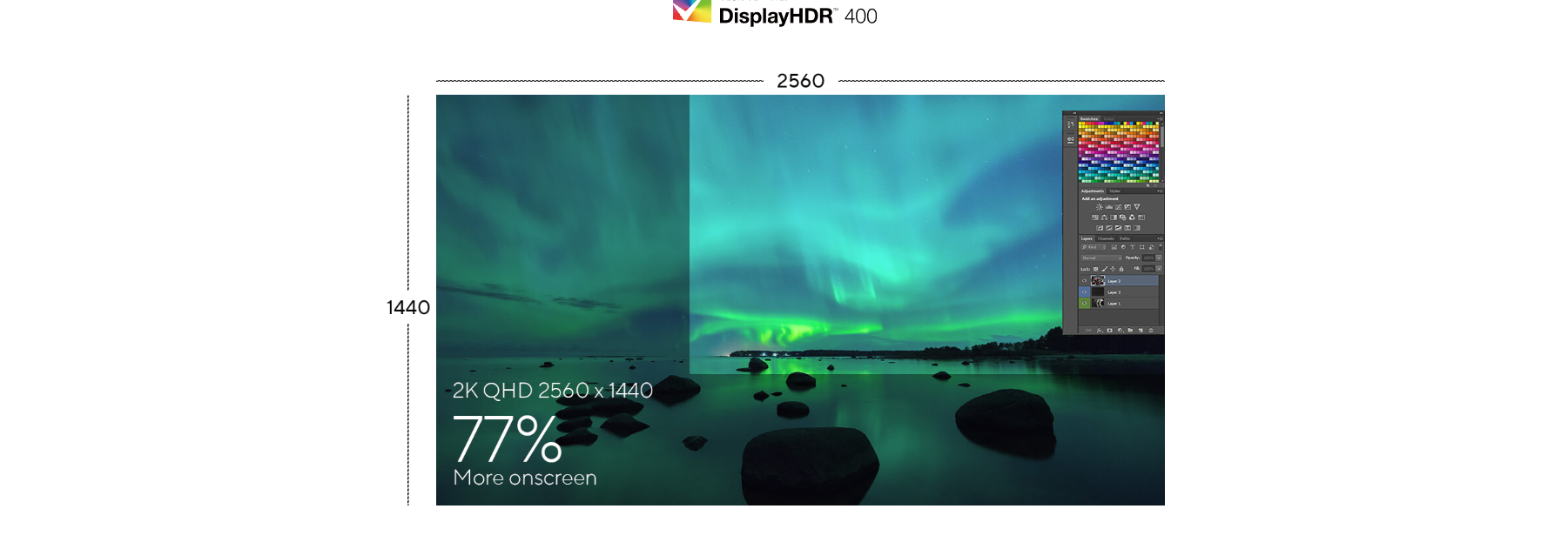
The QHD (2560 x 1440) panel of PA278CFRV delivers high PPI and 77% more pixels than conventional Full HD monitors, offering superior picture quality and sharp imagery for a superbly detailed viewing experience. And, with so much extra screen space, you can work more easily and comfortably with less scrolling and zooming. HDR10 and VESA DisplayHDR™ 400 compatibility ensure the brightest whites and darkest black hues for exceptional contrast that results in rich, lifelike imagery―all to help artists fully realize their creative visions.
LuxPixel™ Technology
ProArt Displays LuxPixel™ Technology features AGLR (Anti-glare, Low-reflection) coating for a paper-like screen effect , can significantly minimizing distracting environmental reflections, ensuring exceptional pixel color accuracy and sharp details for extended creative sessions.
Class-Leading Color Fidelity
Each ProArt display is factory pre-calibrated using a new three-scale process to guarantee industry-leading color fidelity. The display then undergoes stringent testing using ASUS advanced grayscale tracking technology to ensure smoother color gradations, better uniformity, and high color accuracy with a Delta E < 2 color difference.
True Color, Out of the Box
Color professionals rely on color-accurate displays to ensure that their creations look exactly as intended. Each PA278CFRV is Calman Verified and subjected to stringent, meticulous testing to ensure smoother gradation for assured color-accurate viewing and content-creation experiences.
Quick Color Gamut Adjustment
ASUS-exclusive ProArt Preset provides multiple color modes to suit different needs. PA278CFRV is compliant with the DICOM Part 14 standard to ensure smooth gradations and accurate identification of grayscale shading.

2D/3D Rendering Friendly
High frame rates ensure smooth visuals and comfortable viewing experiences. With up to a 100 Hz variable refresh rate (VRR), ProArt Display PA278CFRV is also ideal for game developers who need to conduct quality checks on their creations.
The USB-C That Does it All
The included USB-C® port enables superfast data transfers, DisplayPort connectivity, and 96-watt power delivery to charge laptops and other devices―all via a single cable. PA278CFRV also serves as a USB hub: any device connected to the monitor’s USB ports gains access to other connected peripherals.
Expansive Connectivity
In addition to USB-C, ProArt display offers a myriad of connectivity options including HDMI®, DisplayPort™ (with daisy-chain support), USB Type-A, and additional USB-C downstream port for compatibility with a wide range of devices. DisplayPort allows users to daisy-chain multiple displays from a single video source, enhancing productivity. PA278CFRV also includes a passthrough port for headphones.
Connect to Your Devices Easily
A built-in USB 3.2 hub at the bottom of PA278CFRV includes two USB Type-A port, allowing you to easily connect a variety of devices and peripherals, as well as charge compatible devices.* Additional USB Type-A and USB Type-C port each on the back for expanded connectivity. *Please check the power requirements of your device to ensure they match the monitor’s USB power output.
Ergonomic Stand
Each ProArt display features an ergonomic stand with tilt, swivel, pivot, and height adjustments for comfortable viewing. The ability to pivot the screen clockwise or counterclockwise 90° for use in Portrait mode comes in handy when working with long documents, coding or web browsing. Furthermore, the quick-release feature makes it easy to attach the display via the integrated VESA wall mount―screw-free, so it's done in seconds!
DisplayWidget Center
ASUS DisplayWidget Center is an app that allows you to tweak monitor settings with a mouse instead of using the buttons on the monitor.
Cross Windows / Mac
ProArt Display is seamlessly crosses over between Windows and MacOS systems, offers a truly unified experience for creators to enhance your productivity, streamline your workflow.
Buying guide
Understand the most important product specifications before buying.
Screen Size
27"
The screen size shows how large the display area is.
حجم الشاشة بيوضح مساحة العرض.
Resolution
1440p QHD
Resolution is the number of tiny dots that make up the image, called pixels. For example, 1920×1080 means 1920 pixels wide and 1080 pixels tall. Fewer pixels make the image look less sharp and may show more rough edges, especially on large screens. More pixels make the image cleaner, sharper, and better at showing small details.
الـ Resolution أو دقة الشاشة هي عدد النقط الصغيرة جدًا اللي بتكوّن الصورة، واسمها Pixels. مثلًا 1920×1080 معناها الصورة فيها 1920 نقطة بالعرض و1080 نقطة بالطول. كل ما عدد الـ Pixels يكون أقل، الصورة تبان أقل حدة وقد يظهر فيها تكسير أو تفاصيل أقل، خصوصًا على الشاشات الكبيرة. كل ما العدد يزيد، الصورة تبان أنضف وأوضح والتفاصيل الصغيرة تكون أسهل في الرؤية.
Refresh Rate
100Hz
Refresh rate is how many images the screen can show every second, measured in Hz. For example, 60Hz means 60 images per second, while 144Hz means 144 images per second. Higher refresh rate makes motion look smoother and feel faster, especially in fast games.
معدل التحديث هو عدد الصور اللي الشاشة تقدر تعرضها في الثانية، وبيتقاس بـ Hz. مثلًا 60Hz يعني 60 صورة في الثانية، و144Hz يعني 144 صورة في الثانية. كل ما الرقم أعلى، الحركة تبان أنعم وأسرع في الاستجابة، وده مهم جدًا في الألعاب السريعة.
Panel Type
IPS
The panel type is the screen technology itself. It affects colors, motion speed, viewing angle, and black depth.
نوع البانل هو تقنية الشاشة نفسها. بيأثر على الألوان، سرعة الحركة، زاوية الرؤية، وعمق اللون الأسود.
IPS stands for In-Plane Switching. It is known for good colors and wide viewing angles, so the picture stays clearer when viewed from the side.
IPS اختصار لـ In-Plane Switching. معروف بألوان كويسة وزوايا رؤية واسعة، فالصورة تفضل أوضح حتى من الجنب.
Screen Shape
Flat
Shows whether the screen is flat or curved. Curved screens can feel more immersive, especially in larger sizes.
شكل الشاشة يوضح هل هي مسطحة أو منحنية. الشاشة المنحنية بتدي إحساس اندماج أكتر، خصوصًا في الأحجام الكبيرة.
Response Time (ms)
5ms
Response time means how fast the screen reacts to movement. Lower response time makes fast games look cleaner and reduces blur behind moving objects.
زمن الاستجابة يعني الشاشة بتلحق الحركة بسرعة قد إيه. كل ما الرقم أقل، الألعاب السريعة تبان أوضح ويقل التشويش أو الظل اللي بيظهر ورا الحركة.
HDR (High Dynamic Range)
DisplayHDR 400
High Dynamic Range (HDR) means the screen can show a wider difference between dark and bright areas. Without HDR, a scene with strong light and shadow may lose detail: bright areas can look too white, and dark areas can look too black.
High Dynamic Range (HDR) تقنية معناها إن الشاشة تقدر تعرض فرق أكبر بين الأماكن الغامقة والفاتحة. من غير HDR، المشهد اللي فيه ضوء قوي وظل ممكن تلاقي الجزء المنور أبيض زيادة والتفاصيل ضايعة، أو الجزء الغامق أسود ومش واضح.
DisplayHDR 400 is a VESA HDR certification level. It means the screen reaches a basic HDR brightness level, but it is entry-level HDR compared to higher DisplayHDR levels.
DisplayHDR 400 مستوى اعتماد HDR من VESA. معناه إن الشاشة بتوصل لمستوى HDR أساسي في السطوع، لكنه مستوى أولي مقارنة بالمستويات الأعلى.
Variable Refresh Rate (VRR)
Adaptive-Sync
Any video or game is made of many still images shown quickly one after another, and each image is called a frame. The number of frames the game produces per second is called FPS. When FPS goes up and down during gameplay, VRR lets the screen adjust its speed to match the game, making motion smoother and reducing screen tearing.
أي فيديو أو لعبة هو في الأصل صور ثابتة كتير بتتعرض ورا بعض بسرعة، وكل صورة اسمها Frame. عدد الصور اللي اللعبة بتطلعها في الثانية اسمه FPS. أحيانًا الـ FPS يعلى وينزل أثناء اللعب، فلو الشاشة ثابتة على سرعة معينة واللعبة سرعتها بتتغير، ممكن يظهر تقطيع أو كسر في الصورة. VRR بيخلي الشاشة تغيّر سرعتها مع اللعبة لحظة بلحظة، فتظهر الحركة أنعم ويقل التقطيع لما أداء اللعبة يتغير.
Adaptive-Sync is a Variable Refresh Rate standard that lets the screen change its refresh rate with the game FPS. This makes motion smoother and reduces tearing.
Adaptive-Sync معيار Variable Refresh Rate بيخلي الشاشة تغير معدل التحديث حسب FPS اللعبة. ده ينعم الحركة ويقلل تقطيع الصورة.
Ports
HDMI 2.0, DisplayPort 1.4, USB-C, USB Hub, Headphone Jack
Ports are the places where devices and cables are connected.
المداخل هي أماكن توصيل الأجهزة والكابلات.
HDMI 2.0 is a video and audio standard commonly suitable for 4K at 60Hz. It is good for many consoles, PCs, and screens, but 4K 120Hz usually needs HDMI 2.1. DisplayPort 1.4 is a strong PC display standard for high-resolution and high-refresh gaming monitors. It supports more bandwidth than DisplayPort 1.2. USB-C is a modern reversible port. On monitors, it may carry video, data, and sometimes charging, but the connected device must support video over USB-C. USB Hub means the monitor has USB ports that can act like extra USB ports for the PC. Useful for connecting mouse, keyboard, flash drive, or accessories. Headphone Jack is a 3.5 mm audio port for connecting headphones or speakers directly to the screen.
HDMI 2.0 معيار لنقل الصورة والصوت مناسب غالبًا لـ 4K على 60Hz. جيد لأجهزة وشاشات كتير، لكن 4K 120Hz غالبًا يحتاج HDMI 2.1. DisplayPort 1.4 معيار قوي لشاشات الكمبيوتر الجيمينج عالية الدقة ومعدل التحديث. بيدعم بيانات أكتر من DisplayPort 1.2. USB-C منفذ حديث بيركب من الناحيتين. في الشاشات ممكن ينقل صورة وبيانات وأحيانًا شحن، لكن لازم الجهاز يدعم إخراج الصورة من USB-C. USB Hub يعني الشاشة فيها منافذ USB تشتغل كامتداد للكمبيوتر. مفيد لتوصيل ماوس أو كيبورد أو فلاشة أو إكسسوارات. Headphone Jack منفذ صوت 3.5mm لتوصيل هيدفون أو سماعات مباشرة بالشاشة.
Built-in Speakers
Yes
Built-in speakers mean the screen has sound without needing external speakers.
السماعات المدمجة معناها إن الشاشة فيها صوت من غير سماعات خارجية.
VESA Mount
Yes
VESA support means the screen has screw holes using a known global VESA size. This is different from a normal wall mount; VESA is the mounting standard that allows the screen to fit compatible arms, desk mounts, or wall mounts.
دعم VESA يعني إن الشاشة فيها أماكن مسامير بمقاس عالمي معروف اسمه VESA، وده مختلف عن حامل الحائط العادي Wall Mount.
Works With
PC, Laptop
Means the product can work with these devices, but not necessarily with every feature enabled.
تعمل مع معناها إن المنتج يقدر يشتغل على الأجهزة دي، لكن مش شرط بكل المميزات.
Mount Type
Not Applicable
The mount type shows how the screen or device can be fixed or installed.
نوع الحامل بيوضح طريقة تثبيت الشاشة أو الجهاز.
Supported Monitor Size
Not Applicable
The supported monitor size shows the screen size range that the mount can safely hold.
حجم الشاشة المدعوم يعني الحامل مناسب لشاشات من كام بوصة لكام بوصة. لازم الشاشة تكون داخل النطاق ده عشان التركيب يبقى آمن.
Aspect Ratio
16:9
Aspect ratio is the screen shape based on width compared to height, written as width:height. For example, 16:9 means 16 units wide for every 9 units tall. It defines whether the screen feels standard, wide, or panoramic.
نسبة الأبعاد هي شكل الشاشة من حيث العرض مقارنة بالارتفاع، وبتتكتب بالشكل ده: العرض : الارتفاع. مثلًا 16:9 معناها إن عرض الشاشة 16 وحدة مقابل 9 وحدات ارتفاع. النسبة دي بتحدد شكل الشاشة: عادية، عريضة، أو بانورامية.
HDMI Standard
HDMI 2.0
The HDMI standard shows what the cable or port can carry for video and sound. Higher versions can support higher resolution and higher refresh rate.
معيار HDMI بيوضح قدرة الكابل أو المدخل على نقل الصورة والصوت. الإصدارات الأعلى تدعم دقة أعلى ومعدل تحديث أعلى.
HDMI 2.0 is a video and audio standard commonly suitable for 4K at 60Hz. It is good for many consoles, PCs, and screens, but 4K 120Hz usually needs HDMI 2.1.
HDMI 2.0 معيار لنقل الصورة والصوت مناسب غالبًا لـ 4K على 60Hz. جيد لأجهزة وشاشات كتير، لكن 4K 120Hz غالبًا يحتاج HDMI 2.1.
Ergonomics
Tilt Adjustment, Height Adjustment, Swivel Adjustment, Pivot Adjustment, Wall Mountable, VESA Mount Compatible
Ergonomics means how much the product position can be adjusted, such as height, tilt, or rotation. More adjustment makes long use more comfortable.
خصائص التعديل تعني قدرة تغيير وضع المنتج مثل الارتفاع أو الميل أو الدوران. كل ما التعديل أكتر، الاستخدام الطويل يبقى أريح.
Tilt adjustment lets the screen lean forward or backward. It helps set a comfortable viewing angle. Height adjustment lets you raise or lower the screen. It helps keep the screen at eye level for more comfortable long use. Swivel adjustment lets the screen turn left or right without moving the stand base. Useful for changing viewing direction easily. Pivot adjustment lets the screen rotate into vertical mode. Useful for coding, reading, chat, or long documents. VESA Mount Compatible means the screen or product can fit a standard VESA arm or mount. You still need the correct VESA size and supported weight.
Tilt Adjustment يعني تقدر تميل الشاشة لقدام أو لورا. بيساعدك تظبط زاوية رؤية مريحة. Height Adjustment يعني تقدر تعلي أو توطي الشاشة. بيساعد تخليها في مستوى العين للاستخدام الطويل براحة. Swivel Adjustment يعني الشاشة تلف يمين أو شمال من غير ما تحرك قاعدة الحامل. مفيد لتغيير اتجاه الرؤية بسهولة. Pivot Adjustment يعني الشاشة تلف للوضع الرأسي. مفيد للبرمجة أو القراءة أو الشات أو المستندات الطويلة. VESA Mount Compatible يعني الشاشة أو المنتج يركب على حامل أو ذراع VESA قياسي. لازم تتأكد من مقاس VESA والوزن المدعوم.
Special Features
USB-C Power Delivery, Blue Light Filter, Flicker-Free, Anti-Glare, Built-in Speakers
Extra features that add more value to the product, such as control software, lighting, noise isolation, fast charging, or custom buttons.
المميزات الإضافية هي حاجات بتدي قيمة زيادة للمنتج، زي برنامج تحكم، إضاءة، عزل صوت، شحن سريع، أو أزرار مخصصة.
USB-C Power Delivery means the USB-C port can charge a connected device while also carrying data or display signal, depending on support. Blue Light Filter reduces some blue light from the screen. It can make long viewing more comfortable, especially at night. Flicker-Free means the screen is designed to reduce invisible brightness flicker. This can make long use more comfortable for the eyes. Anti-Glare means the screen surface reduces reflections from lights or windows. It helps the image stay clearer in bright rooms.
USB-C Power Delivery يعني منفذ USB-C يقدر يشحن جهاز متوصل وفي نفس الوقت ينقل بيانات أو صورة حسب الدعم. Blue Light Filter بيقلل جزء من الضوء الأزرق من الشاشة. ممكن يخلي الاستخدام الطويل أريح، خصوصًا بالليل. Flicker-Free يعني الشاشة مصممة لتقليل وميض الإضاءة غير الواضح. ده ممكن يخلي الاستخدام الطويل أريح للعين. Anti-Glare يعني سطح الشاشة بيقلل انعكاس الإضاءة أو الشبابيك. بيساعد الصورة تفضل أوضح في الأماكن المنورة.